




Retained earnings are one of the many financial metrics used to assess a company’s financial health. They can be defined as what remains of a company’s net income after all expenses, including shareholder dividends, have been paid out. The company’s management usually decides whether to use these profits to pay off debt or reinvest in the company. Since management decides how much to pay out in dividends, they can decide to reduce or not pay them out for that period for companies focused on growth or expansion.
In this guide, you will learn what retained earnings are and how they are related to other financial metrics, like profit or dividends. You will also learn how to calculate retained earnings in Google Sheets or Excel with the data available on the company balance sheets.
What are retained earnings?
Retained earnings are the company’s remaining profits after paying off all of its expenses. This includes all costs, whether direct or indirect, as well as shareholder dividends. These retained earnings can be used to pay off debt obligations, or they can be reinvested in different areas of the company, like equipment or research and development.
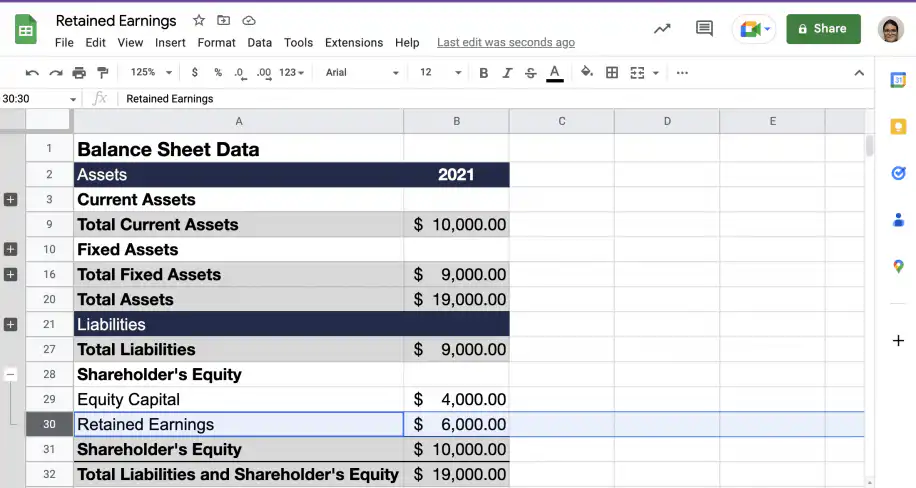
You can find a company’s retained earnings on its balance sheet in the shareholders’ equity section.
Are retained earnings assets?
Retained earnings are considered equity and are listed as such in the corresponding section of the balance sheet under shareholders’ equity. However, while they are not assets in themselves, they can certainly be used to purchase or invest in assets of different types. Retained earnings are often used to buy new equipment or finance research and development.
How to calculate retained earnings?
Retained earnings are calculated at the end of each accounting period: monthly, quarterly, or annually. To calculate retained earnings, take the beginning value for retained earnings and add net income or subtract net loss as appropriate. Finally, subtract the value of net dividends paid to shareholders.
You can use the following formula, also called the retained earnings equation, to calculate retained earnings:
retained earnings = beginning retained earnings +/- net income/net loss – net dividends
In the next section, you have examples of how to calculate retained earnings using the information reported on the company’s balance sheet.
What is an example of retained earnings?
Say your company had a beginning balance of $5000, and the net income at the end of the period was $3000. You also paid out $4000 in dividends to shareholders. You can calculate your retained earnings as follows: $5000 + $3000 – $4000 = $4000.
Let’s see how to calculate retained earnings using Google Sheets. You can easily add this calculation to existing spreadsheet templates for financial statements or financial analysis.
Retained earnings with net income
The steps below show how to calculate retained earnings in Google Sheets when the company has reported positive net income.
1. Gather the necessary data from the balance sheet and income statement.
Net income is the bottom line of the income statement, also called the profit and loss statement. If you don’t have one yet, start with this automated income statement template for Google Sheets.
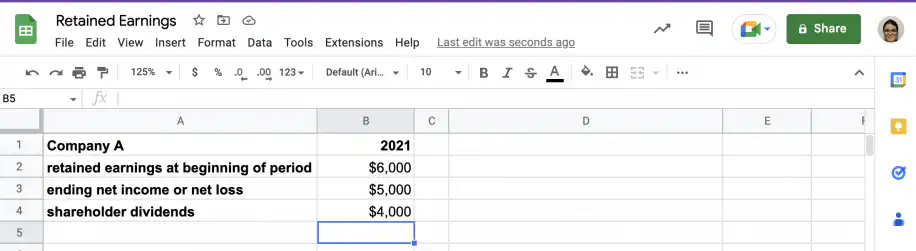
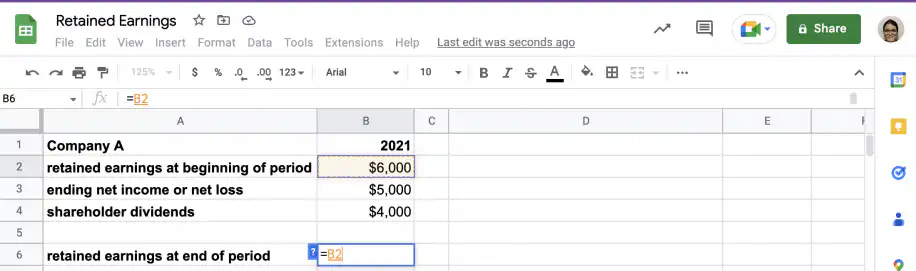
2. In an empty cell, type the equal sign to start the formula and click on the cell containing beginning retained earnings.
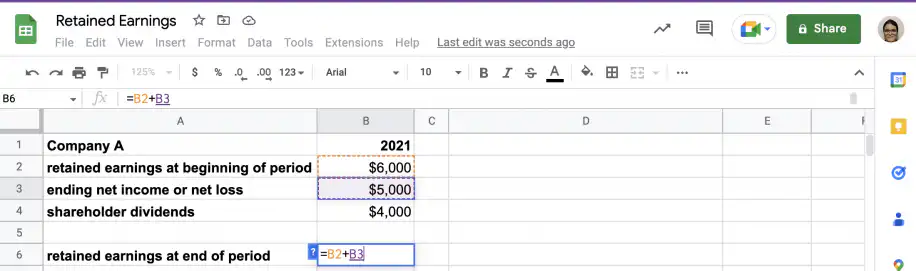
3. Add net income. As you will see in the second example, you can use the same formula for net loss, as Sheets will add or subtract depending on whether the value is positive or negative.
4. Subtract the cell with the amount paid out in dividends to shareholders.
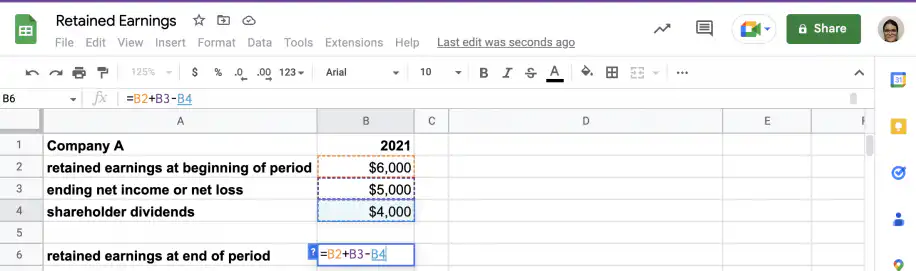
5. That’s it. You have the value for retained earnings.
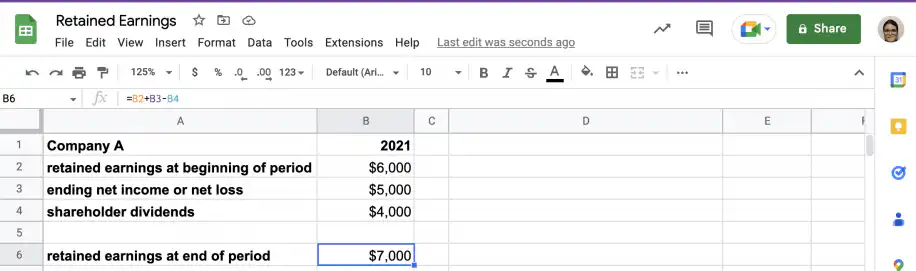
Retained earnings with net losses
The steps below show how to calculate retained earnings in Google Sheets when the company has reported negative net income or net losses.
1. Gather the necessary data from the company’s financial statements.
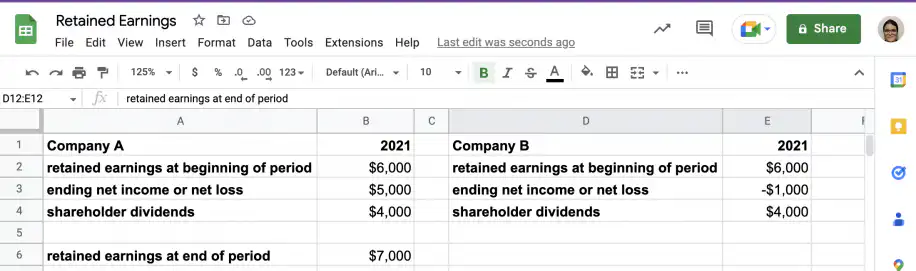
2. Start the formula by typing the equal sign in an empty cell. Add the cell containing the value of beginning retained earnings.
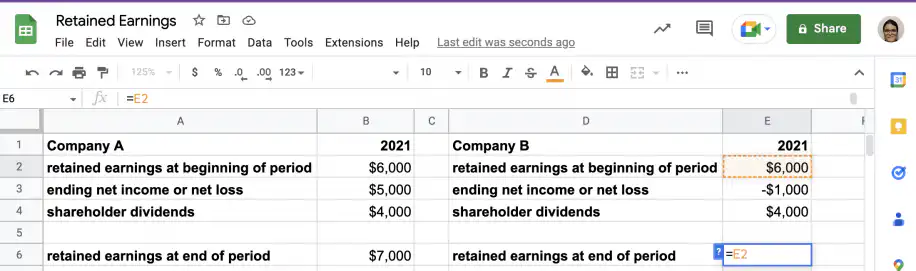
3. Add the cell with the value of net loss. Since the value is negative, Sheets will subtract it from the value of beginning retained earnings.
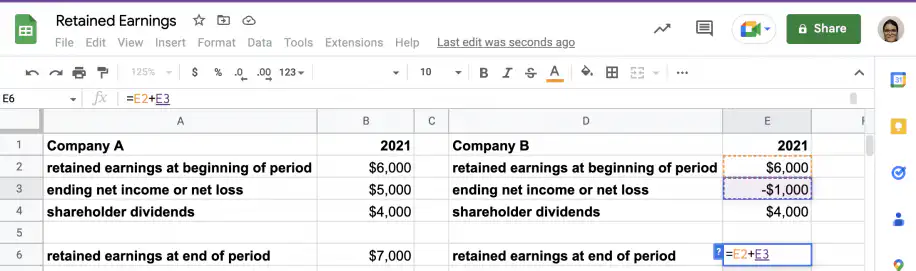
4. Subtract the cell with the amount paid out to shareholders in dividends.
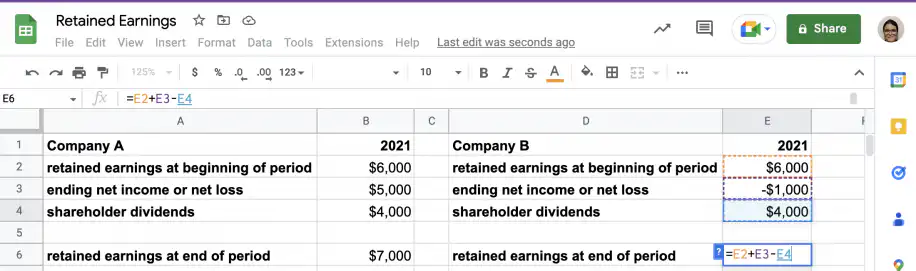
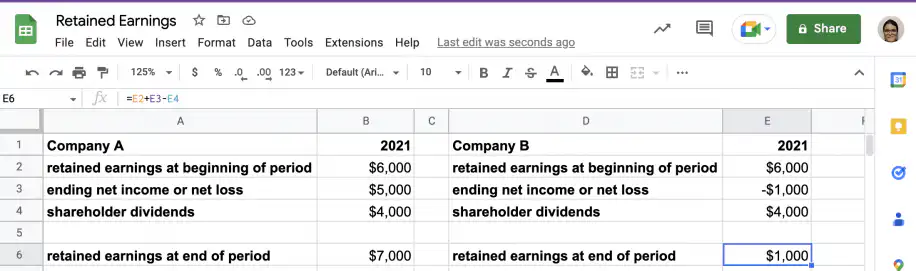
5. That’s it. You have the value for retained earnings. As you can see, Company B has positive retained earnings despite reporting a net loss for the period.
What do retained earnings tell you?
Unlike profits, retained earnings also consider the amount paid out in shareholder dividends. If the company pays out a large amount in dividends, the company’s profits can indicate a positive net income, while retained earnings may still go down for the period.
Therefore, a company’s retained earnings, revenue, and net income are all good indicators of its financial health. Just like with any financial metric, retained earnings should not be considered in isolation. For example, an acceptable range of values will depend not only on the industry and business model but also on the company’s current maturity or status.
Retained earnings are an accounting figure, and they don’t tell you how much cash the company holds. To see how much cash the business actually generates, look at its operating cash flow as well.
For example, low retained earnings are common for young companies that are focusing on survival, as well as more mature companies that are focusing on expansion. However, lower retained earnings are also common to more established companies that pay out large amounts in dividends.
What does it mean to have negative retained earnings?
Given the formula used above, a company can have negative retained earnings if it records net losses with an absolute value higher than its beginning retained earnings. This can also happen if the sum of beginning retained earnings and net income is less than the amount paid out in shareholder dividends.
Conclusion
As you have seen, retained earnings are the profits remaining after all expenses and shareholder dividends have been paid out. The information you need to calculate these is reported on the company’s financial statements, so you can easily add this formula to your current templates in Google Sheets or Microsoft Excel to automate the calculation.
You now know what retained earnings are and how the formula relates them to income and equity. You also know how to calculate retained earnings using Google Sheets. If you work in Excel, the same formula fits into this income statement template for Excel. If your finance team still copies figures between spreadsheets by hand, Sheetgo’s AI finance virtual employee can take on much of that repetitive work, so you can focus on what matters to you and your company.
To learn more about financial statements, and other financial metrics used to assess a company’s financial health, check out:


 English
 Español
 Português do Brasil
 Français