

You can carry out the analysis of financial statements using many methods. Two popular methods that cover different needs are horizontal and vertical analysis. Horizontal analysis studies change over time for a specific variable. Vertical analysis, on the other hand, focuses on a specific period of time and studies the proportions of the total amount represented by the different variables for that period.
In this article, you will learn about the horizontal analysis of financial statements and how to incorporate it into your company’s accounting practices. You will also learn how to do horizontal analysis using an income statement and a balance sheet.
What is a horizontal analysis?
While vertical analysis focuses on the relationships between different variables in your financial statements, horizontal analysis focuses on changes to specific variables over time by expressing the difference in their values as a percentage or an absolute value. That’s exactly why it’s called horizontal analysis – you compare the data from each period side by side to calculate your results.
You can do horizontal analysis using only two periods for the comparison, but it’s highly recommended you use more to avoid drawing and acting on less accurate conclusions.
Horizontal analysis is often referred to as trend analysis, but the latter term has broader applications and is not specific to financial statements. As the name suggests, trend analysis involves identifying trends and predicting outcomes, which requires analyzing data from multiple consecutive periods.
Horizontal analysis formula
Select the base and comparison periods and the values for your chosen variable, then calculate the percentage change between them. Calculating this involves subtracting the base period’s value from the comparison period‘s value, dividing the result by the base period’s value, then multiplying by 100.
percentage change = ((comparison value – base value) / base value) * 100
Now that you know how to calculate percentage change, you can read about all the steps involved in horizontal analysis in the next section.
How to perform horizontal analysis?
The horizontal analysis of financial statements is a relatively straightforward process. As you saw in the previous section, the calculations involved are simple. You can easily set up a template in a spreadsheet to speed up the process. Your focus should be on analysis and interpretation, including which variables and periods you choose. In the next section, I will apply these steps to two different examples: the first with an income statement and the second with a balance sheet.
1. Select time periods
First, decide which periods you will be comparing, carefully choosing comparable periods. For example, if your industry is seasonal, comparing consecutive quarters would provide misleading results. It would make more sense to compare the values for a specific quarter to the same quarter from past years. If you happen to choose a particularly bad time period for your base values, the values for your comparison period may look much better than they are.
2. Gather data
The next step is to identify the data you need. Depending on the metrics you want to focus on, you will need different financial statements, like balance sheets, income statements, or cash-flow statements.
Once you have your company’s values for the variables of interest, you need to find those of similar companies in your industry for the selected time periods. Sometimes you may find horizontal analysis reports, saving you the calculations, but you can always calculate the percentage change yourself using publicly available financial data. Remember to choose companies with similar characteristics for useful comparisons.
3. Calculate the percentage change
It’s possible to do horizontal analysis using absolute change values instead of the percentage change. However, expressing the change as a percentage tends to be more useful, as it allows you to easily compare to other companies and study proportional change. For each variable, calculate the percentage change using the formula:
percentage change = ((comparison value – base value) / base value) * 100
4. Analyze & compare results
Now that you have the percentage change values for your chosen variables – both for your company and others in the same industry – it’s time to analyze your company’s values and those of your competitors. This will allow you to interpret these results within as comprehensive a context as possible.
In the next section, you have step-by-step instructions on how to do horizontal analysis with examples using a balance sheet and an income statement.
Horizontal analysis examples
Fortunately, tools like Google Sheets or Excel allow you to set up templates, so you can forget about the calculations and focus on analysis. With Sheetgo, an AI-powered data automation platform, you can also automate the data flows, so the figures land in your spreadsheet on their own and the results and reports reach the right users.
The two examples below show how to do horizontal analysis using Google Sheets, but you can easily do the same in Excel. The first example is based on a balance sheet, and the second is on an income statement.
You can download the income statement template for free.
Horizontal analysis of income statements
In this first example, I will be doing a horizontal analysis of Company A’s revenue based on its annual income statement.
1. Select time periods
For this example, I will carry out the analysis of the data reported for 2021 and 2022. However, you can do this quickly for multiple years, particularly if you’re interested in long-term trends.
2. Gather data
I can find the data I want to analyze for 2021 and 2022 at the top of the income statement: ‘Revenue’.
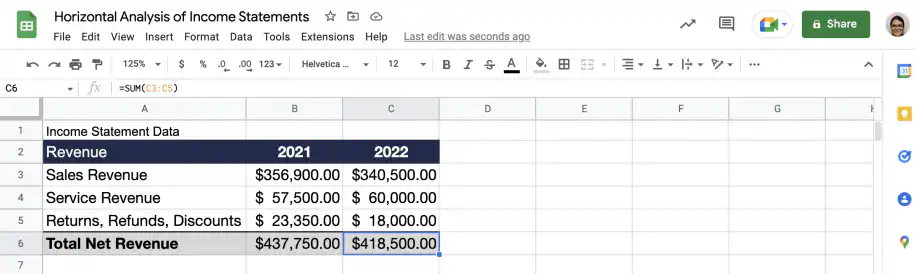
Horizontal Analysis – Income Statement Revenue Data
3. Calculate percentage change
Insert a column to the right of ‘2022’ and click on the cell corresponding to the first revenue line item.
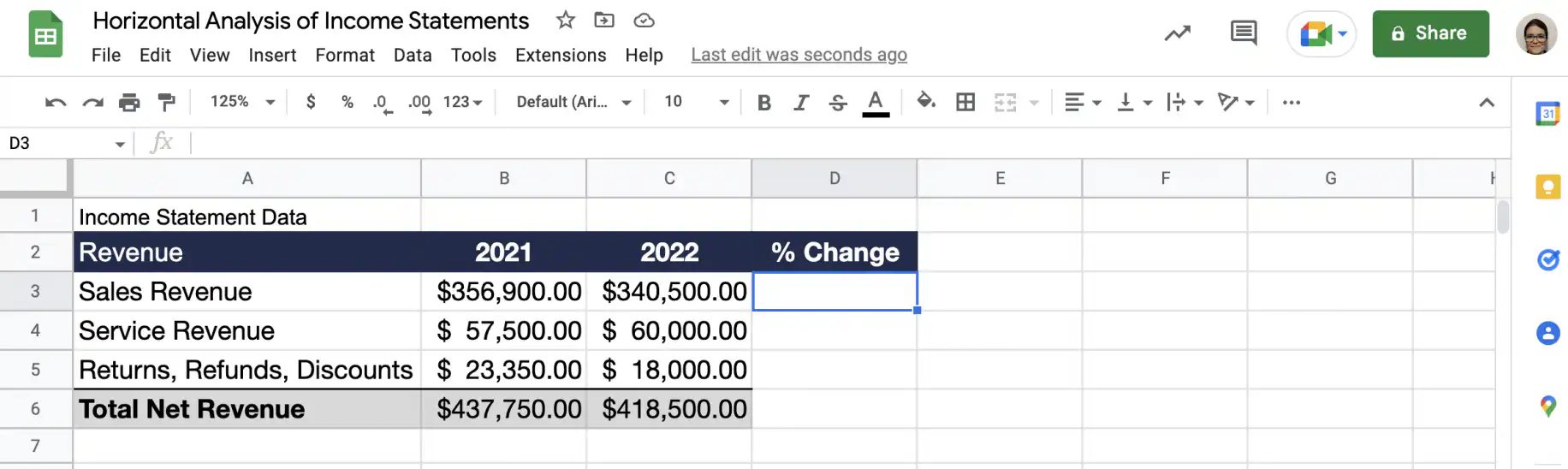
Horizontal Analysis – Income Statement Add Column
Type in the equal sign, then the % change formula using cell references.
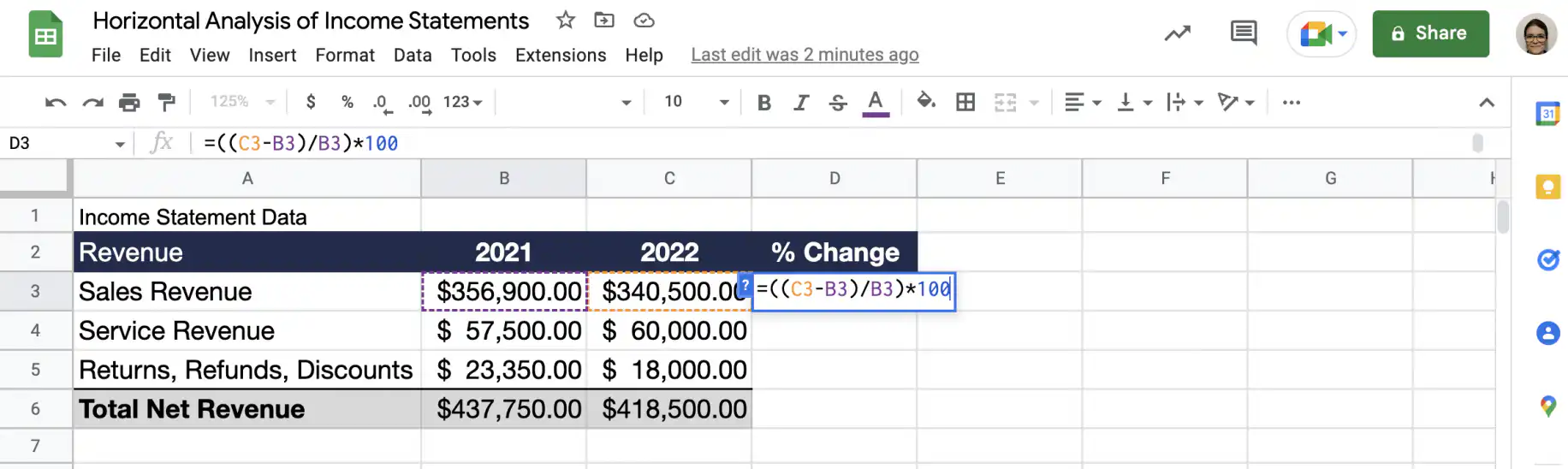
Horizontal Analysis – Income Statement Add Formula
Drag down the cell with the formula to copy it to the other revenue line items, as well as the total net revenue.
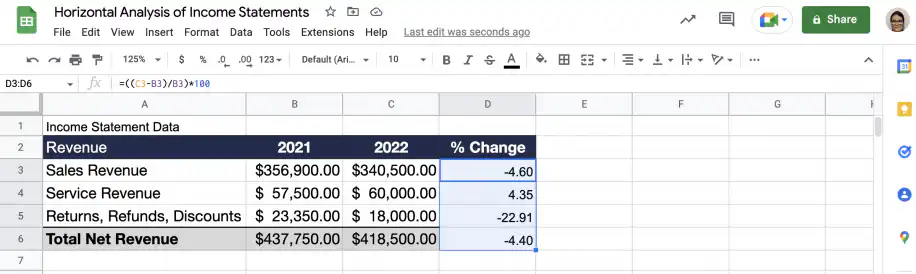
Horizontal Analysis – Income Statement Results
4. Analyze & compare results
Now that I have performed the required calculations on Company A’s data, I need to do the same for companies in the same industry that are similar to Company A. This will allow me to analyze and compare results in context, increasing the likelihood of an accurate interpretation.
The same percentage change formula also helps you find and analyze budget vs. actual variances.
When you compare one year with the one before it, this is also how you calculate year-over-year growth.
Horizontal analysis of balance sheets
In this second example, I will do a horizontal analysis of Company B’s current assets based on the annual balance sheets.
1. Select the time period
For this example, the analysis will be carried out on the data reported for 2021 and 2022. However, you can do this very quickly for multiple years, particularly if you’re interested in long-term trends.
2. Gather data
I can find the data I want to analyze for 2021 and 2022 at the top of the balance sheet: ‘Current Assets’.
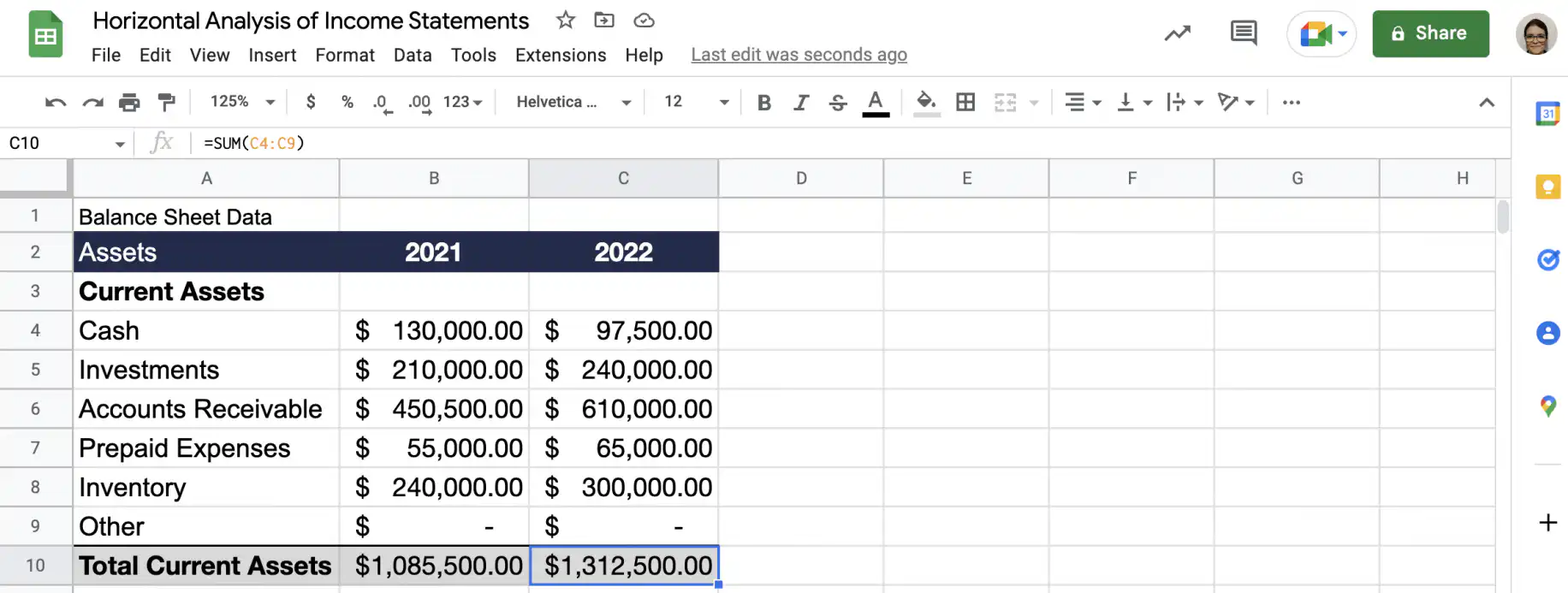
Horizontal Analysis – Balance Sheet Data
3. Calculate % change
Insert a column to the right of ‘2022’ and click on the cell corresponding to the first line item.
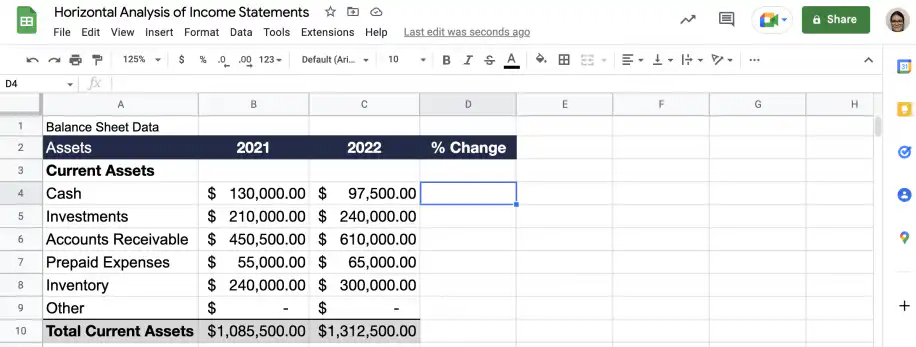
Horizontal Analysis – Balance Sheet Add Column
Type in the equal sign, then the % change formula using cell references.
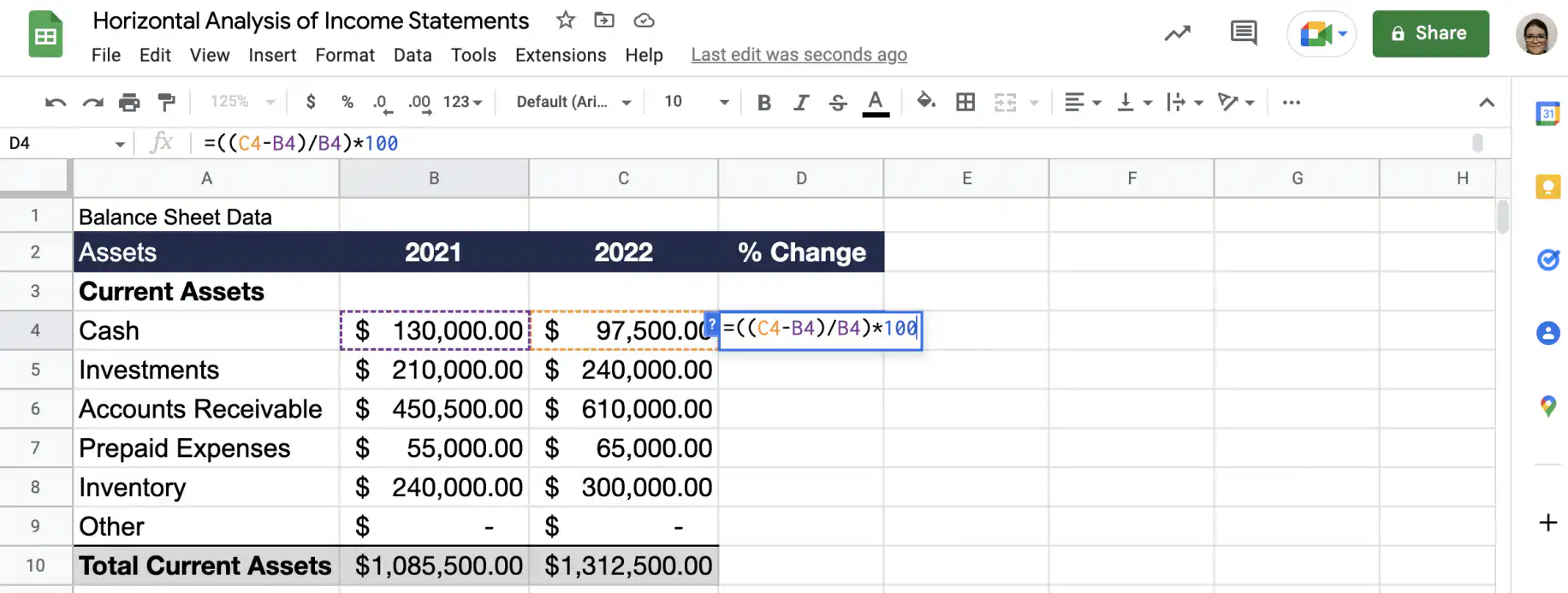
Horizontal Analysis – Balance Sheet Add Formula
Drag down the cell with the formula to copy it to the other current assets line items.
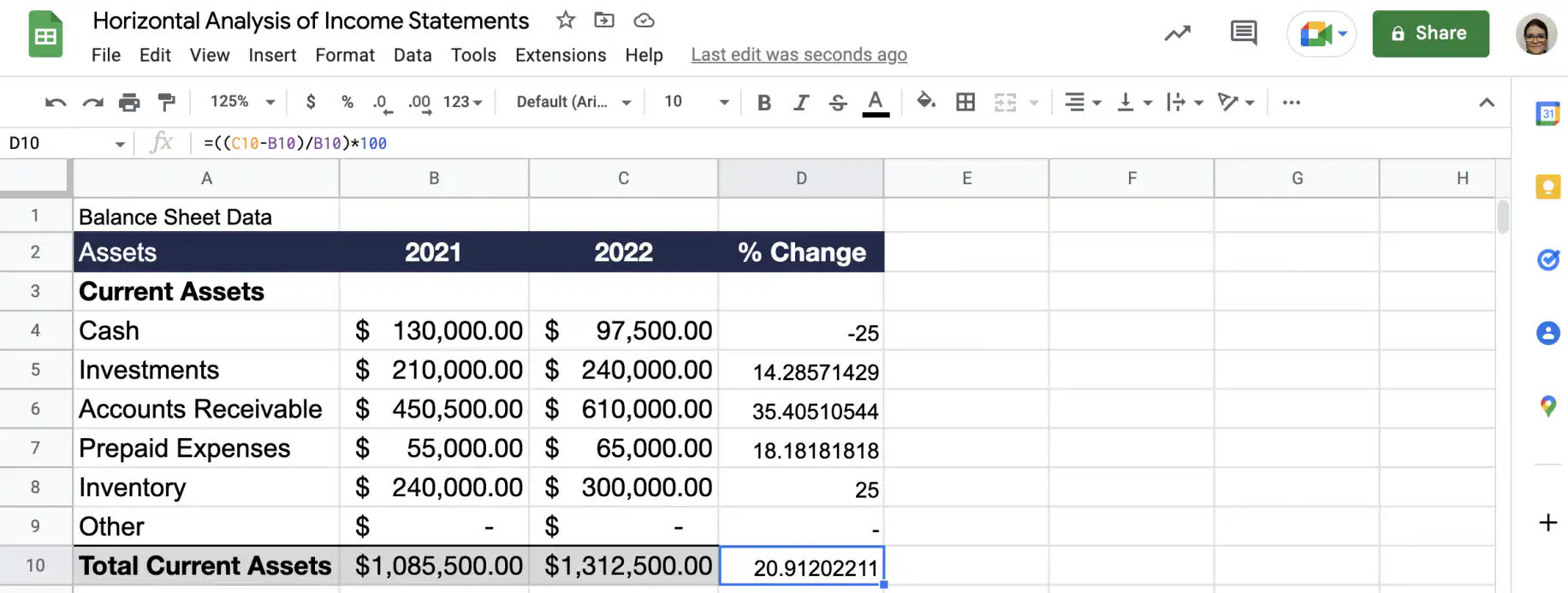
Horizontal Analysis – Balance Sheet Results
4. Analyze & compare results
Now that I have performed the required calculations on Company B’s data, I need to do the same for companies in the same industry that are similar to Company B. This will allow me to analyze and compare results in context, increasing the likelihood of an accurate interpretation.
Conclusion
Horizontal analysis can help you identify trends in your data using your financial statements. Using Excel or Google Sheets is a great way to carry out a horizontal analysis of financial statements, especially if you use a pre-made template. If you use Sheetgo, an AI-powered data automation platform, you can even automate parts of this process, including the data flows, calculations, and sharing the results.
You now know how to do a horizontal analysis of data from your financial statements. You know how to do horizontal analysis using Excel and Google Sheets, using both an income statement and a balance sheet. Check out the following article for more finance-related how-to’s:


 English
  Español
  Português do Brasil
  Français