


Although you can get useful information from studying weekly or monthly figures, it’s important to get a longer and broader view of your business’ growth. A useful metric in this respect is year-over-year growth. Whether you’re looking at growth in terms of revenue, profit, production, or any other metric, year-on-year growth lets you assess actual growth without the effects of seasonality.
In this article, you will learn how to calculate year-over-year growth for different metrics. You will also learn to use Google Sheets to set up templates so you can speed up calculations and keep a record of all calculated values.
What is year-over-year (YOY) growth?
Year over year growth is a financial metric used to express the percentage of change between values a year apart. For example, you can calculate it using the total revenue values for two different years to get year-on-year growth for yearly revenue.
However, you can also calculate it using the monthly or quarterly values for those years. These values are often charted using different types of visualizations, such as a line graph, to facilitate analysis.
How to calculate year-over-year growth?
To calculate year-over-year growth, you first need to select your chosen metric and gather values one year apart. Usually, monthly or quarterly values are used. Subtract the old value from the new one, then divide it by the old value and multiply by 100 to get the growth percentage.
What is the formula for year-over-year growth?
Follow these steps to calculate YOY growth values.
1. Select the comparison periods.
2. Select the values for your chosen metric, which should be taken a year apart.
3. Subtract the old value from the new value and divide the result by the old value to get a decimal.
4. Multiply by 100 to get the percentage.
5. That’s it. You have your YOY percentage growth.
YOY growth = ((new value – old value) / old value) * 100
YOY change formula: increases and decreases year over year
The same formula works whether a metric goes up or down. When the new value is higher than the old one, the result is positive and shows growth. When the new value is lower, the result is negative and shows a decline.
For example, if Company A’s December revenue had fallen from $59,880.00 to $55,443.89, the YOY change would be ((55,443.89 – 59,880.00) / 59,880.00) * 100 = -7.41%.
Keep in mind that a rise and a fall of the same amount give different percentages, because each one is divided by its own starting value. Revenue grew 8% from December 2020 to December 2021, but a fall back to the 2020 figure would be a 7.41% decline. If the old value is zero, the formula can’t return a result, and if it’s negative, the percentage is misleading, so report the change in absolute numbers instead.
Comparing values from the same period across years is a form of horizontal analysis, and lining up several years of YOY figures is the starting point for trend analysis.
How to calculate YOY growth for 3 years?
There are different ways to calculate yearly growth over a three-year period. If you have the values for all three years, you can calculate it using the previous formula. However, if you only have values two or three years apart, you can use the CAGR formula to estimate yearly growth.
CAGR = (EV / BV) ^ (1/n) – 1
- EV – The ending value.
- BV – The beginning value.
- n – The number of years.
To learn more about CAGR, take a look at this article on how to calculate CAGR in Google Sheets.
How to calculate year-over-year growth in Excel or Google Sheets?
As you have seen, the calculation involved is simple; however, these calculations need to be carried out periodically. Ideally, you should keep track of these values to avoid having to recalculate to get a long-term view. Fortunately, tools like Excel or Google Sheets can help you set up templates to keep track of and automate the calculations. If you use templates for your financial statements, you can easily insert YOY growth calculations. However, you can also set them up as a separate template and import the values from the source file/s.
In the next section, you have examples of YOY growth calculations using Google Sheets.
Year-over-year growth examples
The following examples are based on the data for Company A. In the first example, I will calculate YOY revenue growth. In the second example, I will calculate YOY growth for multiple related metrics.
Example 1: YOY growth for a single metric
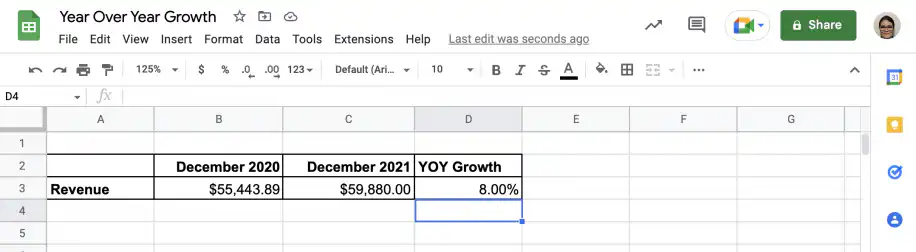
1. Select the timeframe you want to use. For this example, I will use December totals from 2020 and 2021.
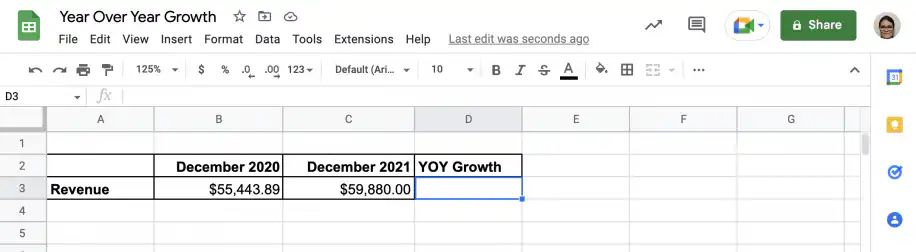
2. Open two sets of parentheses and subtract the old value from the new value. Close the first set of parentheses.
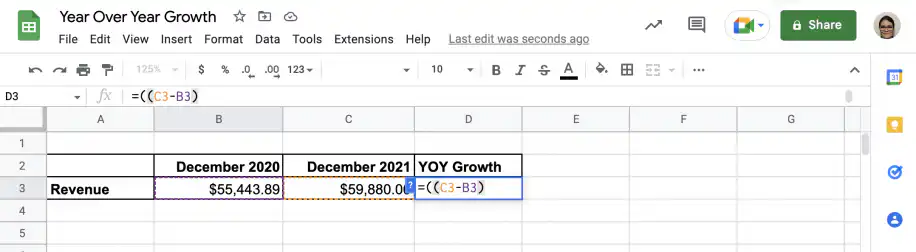
3. Divide by the old value and close the second set of parentheses.
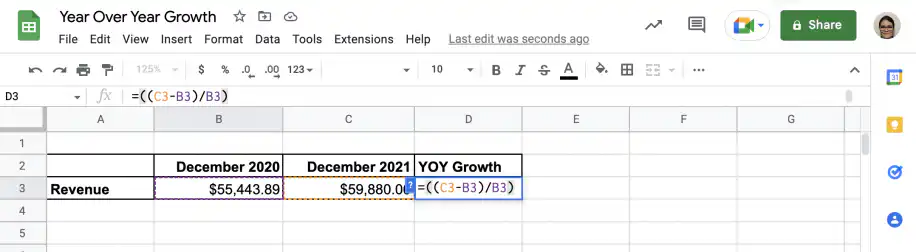
4. Multiply by 100 to get the percentage.
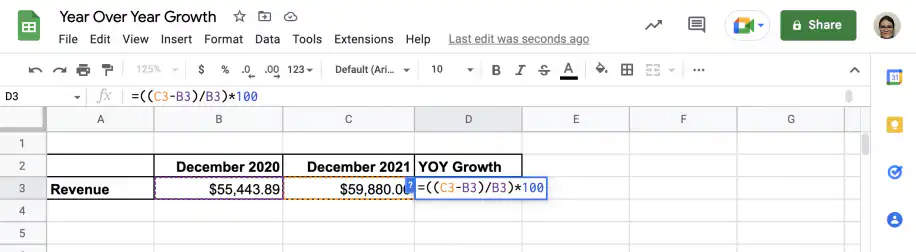
5. That’s it. The value for YOY growth for December values is 8%.
Example 2: YOY growth for multiple metrics
Like in the previous example, I will use data for Company A, but I will include more metrics.
1. I will use December totals from 2020 and 2021 for the metrics shown below.
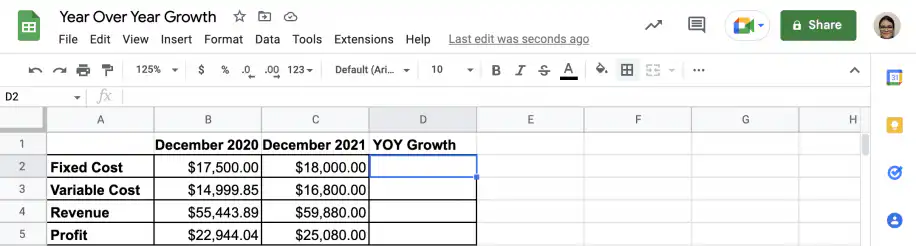
2. Just like in the previous example, I will add the formula for YOY growth using cell references.
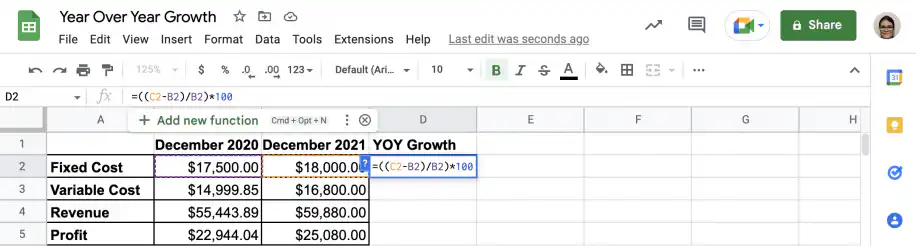
3. Finally, I will drag down the formula to get the values for all the metrics.
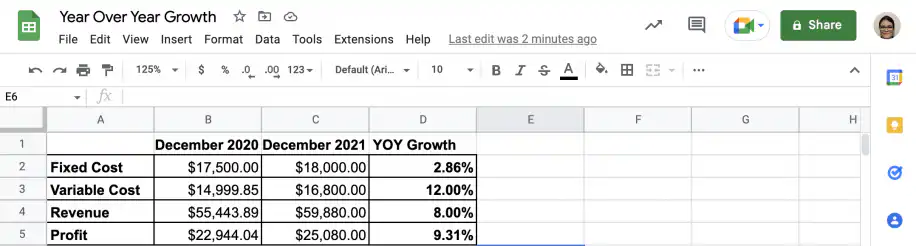
YOY growth calculator in Google Sheets
To reuse these steps every year, turn the sheet from Example 2 into a simple YOY growth calculator.
- In column A, list your metrics. In column B, enter last year’s values, and in column C, this year’s values.
- In cell D2, enter =IFERROR((C2-B2)/B2, "") to get the YOY change for the first metric. IFERROR leaves the cell blank when the old value is missing or zero.
- Format column D with Format > Number > Percent, so you don’t need to multiply by 100.
- Drag the formula down to cover every metric.
When a new year closes, add its values in a new column and point the formula at the two most recent years. A few years of YOY growth rates also give you a starting point for revenue forecasting.
If your finance team collects these figures from several spreadsheets, Sheetgo’s AI finance virtual employee can take on much of that work, such as gathering the numbers and keeping your reports up to date.
Conclusion
Year-over-year growth is an important financial metric. Using YOY growth, you eliminate the effects of seasonality and fluctuations. Instead of comparing February values to January’s, you compare them to February’s of the previous year. This gives you a useful comparison of values, and since it is expressed as a percentage, it’s also easy to compare with similar companies in the industry.
You now know about year-over-year growth and how to calculate it. You also know how to set up a quick template in Google Sheets to calculate year-on-year growth for your chosen metrics. As you have seen, it’s easy to calculate YOY growth using Google Sheets. The calculations are straightforward, but gathering the values for different metrics regularly can be tedious. Fortunately, with Sheetgo, an AI-powered data automation platform, you can connect your templates to their source files so the values update on their own, and share the results automatically. To learn more about other financial formulas related to growth, check out the articles below:


 English
  Español
  Português do Brasil
  Français