


Tracking employees’ working hours is essential for HR administration, payroll, calculating overtime and measuring productivity. In many countries, it’s also a legal requirement.
If you employ freelancers or part-time staff on an hourly basis, you need a simple system for tracking their hours and paying them accordingly.
Even if you manage a full-time workforce, there are many reasons to ask your team to clock in and out. You may want to monitor underperformance or prevent burnout if your staff are being overworked. Unless you are personally present in the office at all times, it can be difficult to get an accurate overview of your team’s hours. And if they work remotely, a convenient online timesheet system is essential.
It’s possible to purchase specialist time-management software. But for SMEs there’s no need to fork out on anything expensive. You can build your own custom hour-tracking system using an employee timesheet template — entirely in spreadsheets.
Why use Google Sheets to manage timesheets?
- Flexible: Online spreadsheets are really flexible so they can be used to create a timesheet system that’s tailor-made for your business. You can alter or adapt the files yourself whenever you need changes — without coding or an IT team.
- Accessible: Because Google Sheets is cloud-based, you can monitor your team’s hours from your laptop or mobile from any location. In addition, you’ll save money on unnecessary software by keeping everything in spreadsheets.
- Compatible with everything: All other software integrates with Google Sheets. As a result, you can import data from other parts of the business, such as finance, centralizing everything into your Google Sheets.
- Simple to use: Most of your team members probably already use spreadsheets, so they will be able to start using a spreadsheet-based timesheet system without any training. As a bonus, the system is future-proof and easy to maintain.
Sign up for Sheetgo and start tracking worked hours automatically

Getting started
Sheetgo’s Employee timesheet template in Google Sheets is a workflow template. That means it’s a pre-built system for automated timesheet management, for multiple team members.
The template gives each employee a simple and private file in which they can log and monitor their working hours and breaks. At the same time, the manager gets an overview of timesheets for the entire team.

What’s a spreadsheet-based workflow template?
Whereas a regular spreadsheet template is a single file containing tables, charts, and formulas, a Sheetgo workflow template is an entire system.
It’s a group of connected Google Sheets that send data back and forth between them. This enables users to share data with others without having to share their own personal spreadsheets.
A spreadsheet-based workflow template gives you:
- Organization and data privacy: Each spreadsheet is dedicated to one task which keeps data flows secure and separated.
- Scalability: Google Sheets’ sharing function is powerful but when you have a lot of people working in the same spreadsheet, the file can become large and slow. Keeping data in individual files helps ensure that the system works smoothly. Every time you need to add another timesheet, you can simply copy one of the spreadsheets and share it with the additional colleague.
- Integration: As well as being able to import data from different software, a spreadsheet-based workflow allows HR managers to merge data from departments. In a couple of clicks, you can connect your employee timesheet workflow with your accounting workflow (or those from other departments) to create reports for directors.
What you get with this template:
When you install the Sheetgo Employee timesheet template, three Google Sheets files with pre-built Sheetgo connections are saved to your Google Drive:
Two Employee spreadsheets in a folder. Rename and share these files with team members and make as many copies as you need for additional employees. Each employee uses their personal file to record the hours they work.
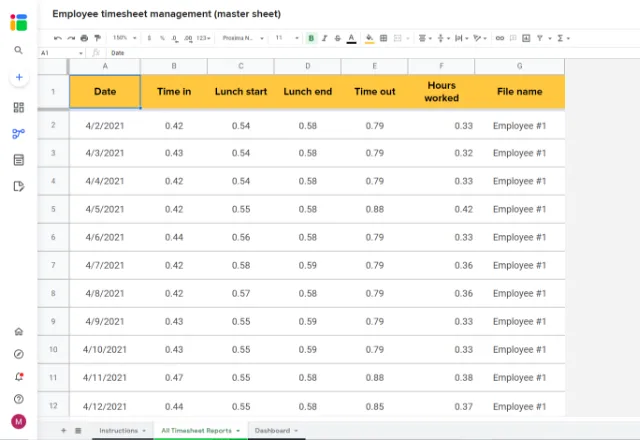
One Employee Timesheet Management master sheet for the HR manager. Data flows into this file from the Employee spreadsheets, providing a summary of everyone’s working hours and automated dashboard charts.

How to get the workflow template
Click on the blue button below to install the Sheetgo Employee Timesheet workflow template
- Login to Sheetgo with your Google, Microsoft, or Dropbox account.
- Click Install template.
- Wait a few moments while Sheetgo creates copies of the files and connects them.
The Employee Timesheet management master sheet opens inside Sheetgo.
In the workflow diagram in the side panel on the right of the screen, you will see arrows running from the folder of Employee spreadsheets into the master sheet. These are the Sheetgo connections that transport data from file to file.

How to use the Employee Timesheet template
Step 1: Delete the sample data
You’ll notice that the Employee files contain sample data in the Timesheet tab — this is just to show you how the whole template works. You can delete this information or ask your colleagues to do it themselves before they start using the spreadsheet.
Step 2: Share the spreadsheets with your colleagues
From inside Sheetgo, open one of the Employee spreadsheets then click Share in the top-right hand corner of the screen.

Now rename the spreadsheet and share it with the appropriate colleague using the green Share button in Google Sheets.
Step 3: Employees start clocking their hours
Once they have been allocated a personal spreadsheet, each employee should start to register their working hours in the Timesheet tab.
There’s no need for them to enter anything in the gray Column F (Hours Worked) as the template calculates this automatically.

Step 4: Transfer the data
When all your team members have started recording their hours you need to pull that data into your master sheet by updating the workflow.
The template contains pre-built Sheetgo connections, so you can do this in one click.
Click on Workflow to open the sidebar and then click Run.

Start tracking worked hours automatically
Step 5: Automate your timesheet workflow
If you’re managing a large team and dealing with multiple timesheets, you can schedule the workflow to run automatically so you’ve always got the latest timesheet data from every employee.
Click on Workflow and then select Automate from the menu bar.
Choose how often you want automatic transfers: from once an hour to once a month.

How to add more Employee sheets
You can add more Employee spreadsheets to the workflow by duplicating one of the input sheets and connecting it with new Sheetgo connections.
1. Go to your Google Drive and open the folder Sheetgo Templates > Employee Timesheet management.
2. Right-click on one of the Employee Files and click Make a Copy.

4.Next to the connection All Timesheet Reports click on the 3-dots menu (⋮) and select Edit.

Under Source data: Multiple files, you will see the two Employee files that are currently connected.
5. Click +Add another source file
6. Click +Select file, locate the new employee file inside Google Drive, and click Done.
7. The file appears in Sheetgo. Now select the correct file tab: Timesheet.
8. Click Finish and save.
If you take a look at the Workflow, you will see that the new file is now connected.

For more guidance on expanding the template, check out the instructions here.



 English
 Español
 Português do Brasil
 Français