



The fact that we can’t predict the future doesn’t mean that we should stop trying to prepare for it. SMEs can be especially vulnerable to the effects of external forces, particularly when they’re starting up. Using scenario analysis, you can explore the effects of different scenarios on your financial modeling. This can help you come up with an effective strategy that achieves your objectives and minimizes your vulnerability.
In this article, you will learn about scenario analysis and how it differs from sensitivity analysis, as well as the types of scenarios usually analyzed. You will also learn how to perform scenario analysis and see an example using Google Sheets.
What is scenario analysis?
Scenario analysis is a very useful planning tool in any field, as it allows you to evaluate the effects of changes to key variables by analyzing multiple scenarios. While no tool can predict the future, scenario analysis can help you come up with more resilient or more adaptable strategies.
Depending on the issue you want to focus on, you will need to use different types of specific scenarios. However, it’s usually a good idea to include at least the three described in the next section.
Types of scenario
The purpose of scenario analysis is to contemplate multiple possibilities. This allows you to try different options to observe how any change to key variables can affect others. Ideally, you will analyze at least three scenarios: base, best, and worst. In all cases, talk to those who are directly involved, and can help you identify key assumptions and decide on values.
Base scenario
This is often the most reasonable or realistic scenario. The basic assumption is that no extreme or unexpected changes will occur. In other words, the values for the key variables will be what you could reasonably expect following previous behavior.
Best scenario
In this scenario, the assumption is that the values for key external variables are the best possible ones. If one of your key variables is the price of material X, assume it’s the lowest possible price. However, remember to also consider the possibility of indirect consequences.
Worst scenario
This scenario contemplates the consequences of the worst possible set of circumstances: i.e., increased costs, production problems, etc. This can help you identify your biggest dependencies and weaknesses.
How to perform scenario analysis?
Follow the steps below to carry out your own scenario analysis. In the next section, you have an example of how to set it up in Google Sheets.
1. Define the issue
The first step is to define the issue you wish to analyze. Do you want to study how the addition of a new product or service might affect your company? Maybe you want to study what would happen if the cost of labor or raw materials changed.
You need to be clear about the decisions you want to make based on your analysis of different potential scenarios. Remember to also keep track of any assumptions you are making regarding cause and effect, as you may have to change them.
2. Gather data
Next, you need to identify the key variables and metrics involved. Remember to keep track of which key variables you will modify for each scenario, such as the cost of raw materials, and which ones you control, like the price per unit. Remember to use metrics that are reliable indicators of what you want to analyze. These are the same inputs you use to calculate your break-even point.
3. Create a scenario template
Once you have selected the metrics, you need to set up a template for the scenarios. Most of the time, you will be carrying out this analysis using existing financial documents and models, such as a budget forecast. This means you can adapt the document for use as the scenario template, so it’s easy to switch and update values.
4. Set up scenarios
Now that you have a template, you can set up each of the scenarios. This will include making assumptions about the values for the key variables in each scenario. Remember to think about less direct effects on other variables.
For example, a shortage of a crucial raw material will also affect competitors: will demand remain steady and justify much higher selling prices? Will demand diminish as customers find alternative products?
5. Evaluate results
Once you have calculated and evaluated the different scenarios, you can start making decisions. As mentioned, it’s best to evaluate at least three scenarios before making a decision.
The base case should be the most realistic among these, but you also need to see what would happen to your model in extreme situations, whether positive or negative. However, you’re not limited to those three scenarios: you should evaluate as many as you need to.
How to perform scenario analysis in Google Sheets?
As you have seen, scenario analysis requires research and a lot of thinking. In fact, the majority of your time should be spent on thinking; this includes defining the problem, deciding on the metrics and scenario parameters, and interpreting the results of multiple scenarios.
Fortunately, tools like Excel or Google Sheets make this thinking process easier as they allow you to set up templates and automate calculations. You will need to be careful setting up the formulas and cell references initially, and it’s highly recommended to get help from people knowledgeable in spreadsheet software and financial metrics and analyses.
I will use a simplified financial model for this example, but you can use the same method to build more detailed ones.
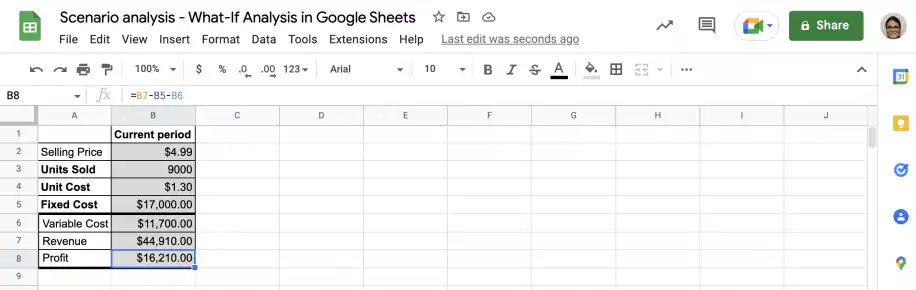
1. Gather the required data and set up the formulas. In the screenshot below, you can see that the last three rows are formulas that depend on the values in the first four rows.
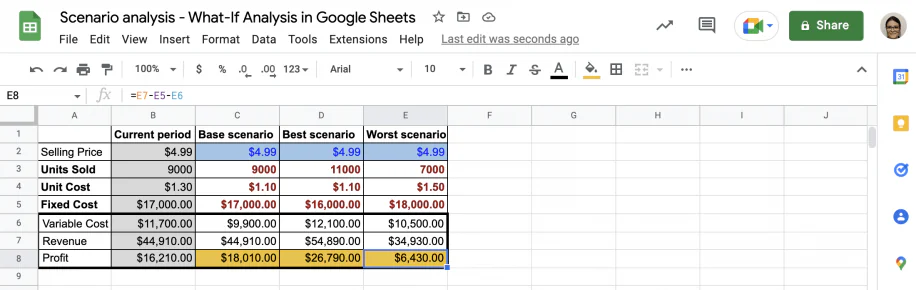
2. Copy the column with the current period data as many times as you need: one per scenario. Below, you can see I have modified the data for ‘units sold’, ‘unit cost’, and ‘fixed cost’ according to the expectations for each scenario.
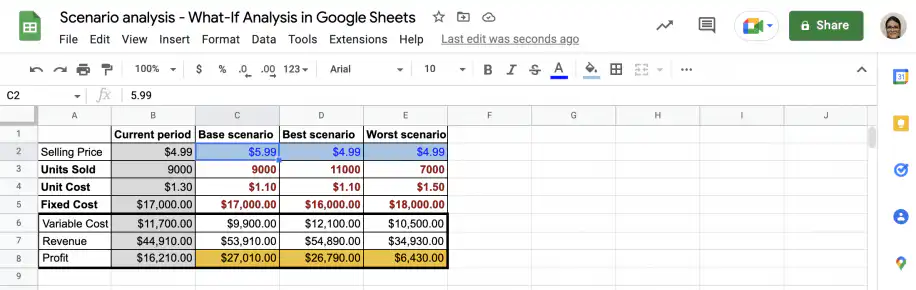
3. To see the effects of changes in selling price, simply type it into the corresponding scenario in the cells highlighted in blue below.
With Sheetgo’s AI automations, you can bring together data from different sources and in different formats. You can connect your spreadsheets and schedule updates so your scenarios always run on the latest data. For recurring finance work, Sheetgo’s AI finance virtual employee can gather the figures and keep your model up to date.
Scenario analysis vs. sensitivity analysis
Both sensitivity and scenario analysis are popular types of what-if analysis. While scenario analysis evaluates the effects of changing multiple variables in your model, sensitivity analysis focuses on one key variable at a time to see how the model responds. If you already know the result you want, goal seek in Google Sheets finds the input value that gets you there.
Conclusion
As you have seen, scenario analysis is a very useful planning tool, regardless of your industry. Common uses in finance include decision-making regarding new products or services, investments, or any changes to the existing business model. However, depending on the issue and the variables involved, it can be a complex and time-consuming process. Fortunately, Google Sheets and Sheetgo’s AI automations save you time and help you avoid mistakes.
You now know about scenario analysis in finance and the types of scenarios usually used. Before embarking on a project, it’s a good idea to evaluate different scenarios, covering the spectrum from the best case to the worst case. You also know how to perform scenario analysis and how Google Sheets and Sheetgo’s AI can help you automate tedious and error-prone tasks.


 English
 Español
 Português do Brasil
 Français