




When it comes to investment opportunities, everyone wants an answer to the same question: is it worth it? Unfortunately, there’s no way to be certain. However, there are many financial formulas and analyses that can help you make an educated guess and not just flip a coin to decide.
Given the amount of historical data available on different industries, companies, and markets, it’s possible to make some very educated guesses. However, depending on the type of investment you’re considering, you may not have access to much historical information – for example, investing in a startup in a new market.
In this article, you will learn about one of the most widely used valuation methods: discounted cash flow (DCF) analysis. In addition to learning about the steps involved in DCF analysis, you’ll also learn about the main limitations of this method and how to minimize them. Finally, you’ll learn how to use this valuation method in Microsoft Excel or Google Sheets and how Sheetgo’s AI automations can help you manage and automate the process. To learn more about business valuation methods, check out this article on How to Calculate the Value of a Company.
What is a discounted cash flow (DCF) analysis?
Discounted cash flow analysis is a popular valuation method that estimates the value of the investment based on predicted cash flows. The DCF formula provides the present value of the investment, also known as the maximum amount you should pay given the expected growth and interest rates, as well as the duration of the investment.
This method relies on the time value of money, which assumes that the dollar you have today is worth more than the one you will receive tomorrow. The reasoning behind this is that if you have the dollar today, you can invest it and make more money. While the DCF formula can theoretically be used for any kind of investment, it makes some crucial assumptions that may not be acceptable in every situation.
How to perform a discounted cash flow analysis?
Discounted cash flow refers to the sum of all future discounted cash flows. In other words, you need to estimate the discounted value for all future cash flows for the investment period. Many possible methods are available to estimate these values, but none can guarantee results.
This is why it’s important to understand the process and the assumptions behind the calculations. If possible, it’s best to get estimates from different analysts for both the expected cash flows and rates, particularly when you don’t have a lot of historical data to work with.
DCF formula syntax
The formula used to calculate discounted cash flow is the following:
discounted cash flow = cf1 / (1+r)^1 + cf2 / (1+r)^2 + …cfn / (1+r)^n
Where,
- cfn = cash flow projection for the year
- r = discount rate in decimal form
- n = investment period in years
How to calculate discounted cash flow?
Follow the steps below to find the value for discounted cash flow.
Step 1. Cash flows
The first step is to get estimates for projected cash flows. Our guide to financial modeling and forecasting covers common ways to build them. It’s important to remember that these are projections, so it’s not an exact science. The more information you have, the better, but there are no guarantees.
Step 2. Discount rate
The second step is to determine an appropriate discount rate. Again, this is an estimate, so it might be worth exploring different options. Very often, the value used for the discount rate is the company’s Weighted Average Cost of Capital (WACC).
Step 3. Calculate discounted cash flow
Once you have the cash flows and discount rate estimates, use the formula to calculate the discounted cash flow value. If you’re considering multiple scenarios, calculate the value for each one.
Step 4. Evaluate the results
Generally speaking, if the DCF value is higher than the cost of the investment, it’s worth considering. If the value is lower, it’s a less attractive investment. However, it may still be worth doing further research and using other valuation methods.
To keep your past and projected cash flows in one place, you can start from our cash flow template in Google Sheets.
Discounted cash flow valuation in Excel or Google Sheets
As mentioned above, DCF analysis deals with cash flow and discount rate estimates, not actual values, so it’s always a good idea to gather different estimates to conduct a what-if analysis. Additionally, different valuation methods can help you get a more complete picture of the potential investment.
In other words, a thorough analysis requires the use of spreadsheet software to avoid mistakes and save time. You can use tools like Microsoft Excel and Google Sheets to automate the calculations, so you can evaluate different scenarios and run multiple calculations simultaneously. For a ready-made model with these steps already set up, use our DCF template in Google Sheets.
However, data management and synchronization are especially important in these cases. The data you need is usually stored in different locations and formats, and various people need to access and analyze that data. Once the results are ready, the reports need to be shared with the interested parties. Sheetgo’s AI finance virtual employee can take on this work, from collecting the data to sharing the final reports.
Discounted cash flow analysis example
Imagine you are currently considering investing in a project. The investment has a cost of $150,000 and a duration of 5 years.
For the sake of simplicity, let’s assume that the cash flows have been carefully calculated using available historical data and the discount rate is reasonable. Follow the steps below to find the DCF value.
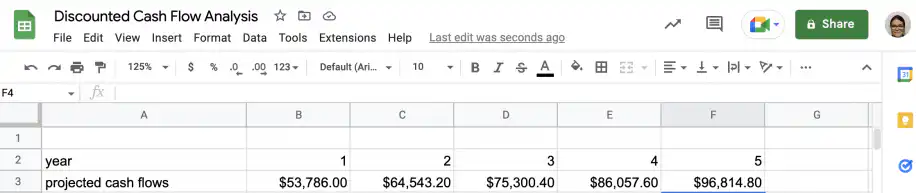
Step 1. Cash flows
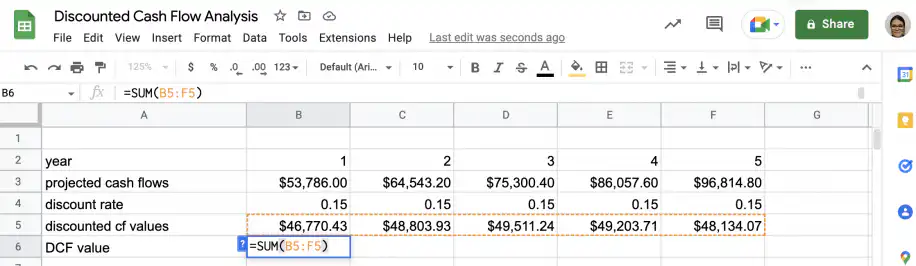
In Google Sheets, create a table like the one below. The first row has the year number, and the second has the projected cash flows for those years.
Step 2. Discount rate
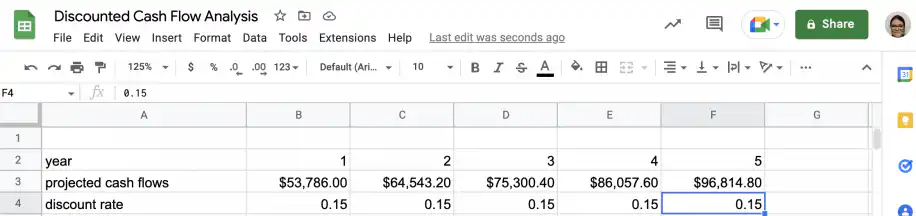
Add the discount rate, as a decimal, below the projected cash flows.
Step 3. Calculate DCF
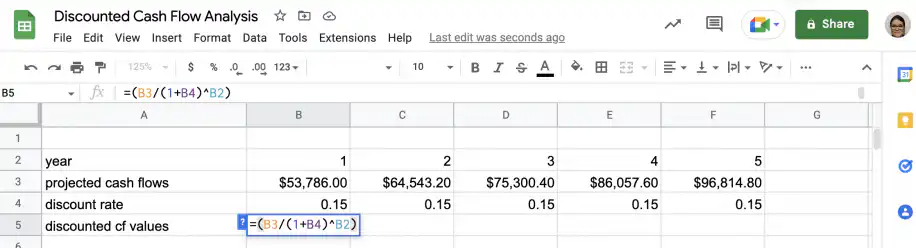
In a new row, type in the formula to discount the first cash flow projection. In this example, the formula in cell B5 is =(B3/(1+B4)^B2).
Drag the formula to the right to get the discounted cash flow projections.
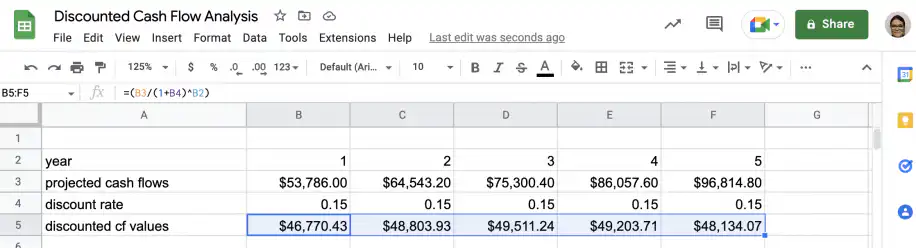
Add the discounted cash flow values to get the final DCF value. In cell B6, the formula is =SUM(B5:F5).
Step 4. Evaluate results
As you can see, the value for DCF ($242,423.38) is higher than the cost of the investment ($150,000), so it might be worth considering.
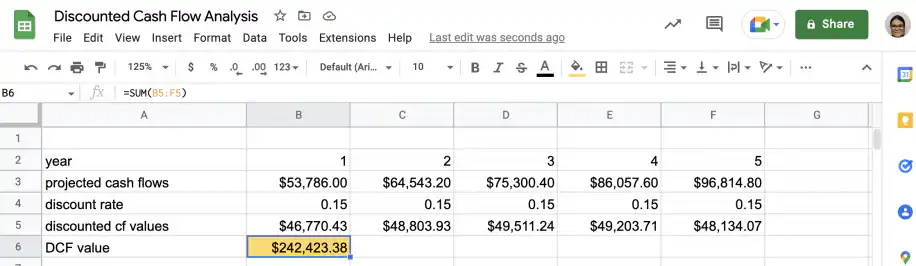
Google Sheets can also do this in one step: =NPV(B4,B3:F3) returns the same $242,423.38. Learn more about how to use the NPV formula in Google Sheets.
Is DCF a good valuation method?
The discounted cash flow method is widely used as many believe it provides a fairer and more objective valuation. DCF analysis doesn’t consider stock value or market sentiment, which can be volatile and sensitive to external factors. Instead, it focuses on the projected growth rates, annual cash flows, and discount rate.
However, some assumptions inherent to the DCF method can limit its usefulness in specific circumstances. In any case, you should never rely on a single formula or method when it comes to forecasting values. Below, you have a summary of the main limitations, as well as some recommendations for use.
Limitations of DCF analysis
As mentioned above, there are limitations to any method, particularly those that aim to forecast values. Below, you have a summary of the main limitations of DCF analysis.
All estimates
The DCF relies on estimated values for all parameters. In other words, it doesn’t use any real figures directly. The potential usefulness of the method is entirely dependent on how accurate the projections turn out to be.
Increasing uncertainty
This method can be used to calculate values for very long-term investments. However, as we get further away from the present time, the values become complete guesswork. With enough accurate historical and contextual data, it’s possible to get well-informed estimates, but if you can’t get reliable projections, you should consider alternative methods.
External factors
Many factors affect the value of cash flows but cannot be easily quantified. This includes, but is not limited to, changes in demand, competitor behavior, technological advances, and unexpected events.
DCF analysis tips
- Use multiple valuation methods: Don’t rely on a single method to make your decision. When it comes to investments, there are many aspects to consider, and no single method covers them all.
- Gather contextual information: Make sure you gather as much information as possible about whatever you’re investing in, whether a project or a company.
- Automate whatever you can: Use spreadsheet software to automate calculations and avoid mistakes. With Sheetgo’s AI automations, you can connect data across files and automate repetitive tasks.
Conclusion
Many methods are available to help you evaluate a potential investment. Discounted cash flow analysis is a widely used valuation method that relies on the time value of money and the accuracy of cash flow projections. When dealing with predicted values, it’s best to get multiple estimates and not rely on a single method.
You now know about the benefits and limitations of this valuation method, the steps involved in discounted cash flow analysis, and how to use the DCF formula. You also know how to calculate DCF using Microsoft Excel or Google Sheets and how Sheetgo’s AI can help you manage and automate the process.


 English
 Español
 Português do Brasil
 Français