


Whether you’re an accountant, an investor, or a business owner, you probably spend quite a bit of time worrying about the state of the company’s health. One particular area of interest is the company’s liquidity: given its assets, can the business pay back its debt in time? Two frequently used liquidity ratios are the current ratio and the quick ratio. The current ratio divides current assets by short-term liabilities to indicate the company’s ability to pay the latter using the former.
In this article, you will learn about the current ratio and how to use it. You will also learn how to add the formula to your spreadsheet to automatically perform current ratio calculations. Additionally, you will learn how tools like Google Sheets and Sheetgo, an AI-powered data automation platform, can help you set up a template and automate data flows, calculation updates, and sharing.
Why is current ratio calculated?
The current ratio is one of multiple financial ratios used to assess the financial health of a company. Specifically, the current ratio expresses a business’ ability to pay back short-term debt using only current assets. These include highly liquid assets like cash and marketable securities, but also less liquid assets, like inventory.
Current ratio calculation
You can calculate the current ratio – also known as the current asset ratio – by dividing current assets by current liabilities. Remember to only include current assets and liabilities in your total – no long-term investments or debt.
The data you need is in the company’s financial statements; the values for current assets and current liabilities are on the balance sheet.
Current ratio formula
To calculate a business’ current ratio, use the following formula:
current ratio = current assets / current liabilities
What is a good current ratio?
A current ratio between 1.5 and 3 is generally considered good. Since this ratio is calculated by dividing current assets by current liabilities, a ratio above 1 implies that the company can cover current liabilities within a year.
If the ratio is above 3, the company may be mismanaging or underutilizing assets. If the ratio is below 1, the company’s current liabilities are greater than its assets. This can cast doubt on the company’s liquidity and its ability to pay back short-term debt.
However, there are always exceptions, particularly as some accounting methods and financial strategies could result in abnormally high or low current ratios. For example, keeping a very tight inventory control or heavily reinvesting in the company can lead to lower current ratios. That’s why it’s important to consider multiple ratios and metrics in your analysis: to avoid drawing inaccurate conclusions.
Quick ratio vs current ratio
Another popular liquidity ratio is the quick ratio. Unlike the current ratio – which weighs all current assets against current liabilities – the quick ratio focuses exclusively on quick assets. These assets can be converted into cash quickly, usually within 3 months.
Current ratio examples
If a company has current assets valued at $185,000.00 and its current liabilities total $103,000.00, the current ratio can be calculated as follows:
$185,000.00 / $103,000.00 = 1.796116505
A ratio of 1.8 would usually be considered a healthy current ratio.
However, if current assets are worth $56,000.00 and liabilities are $135,000.00:
$56,000.00 / $135,000.00 = 0.4148148148
A current ratio with a value of 0.41 is something that most investors would be concerned about, barring exceptional circumstances.
How to calculate the current ratio in Google Sheets?
Let’s say you want to calculate the current ratio for Company A in Google Sheets. The company has the data shown below on the balance sheet.
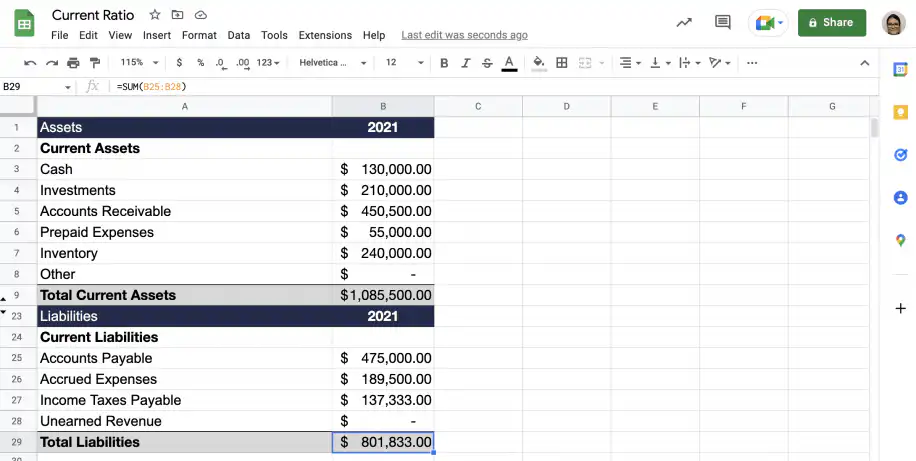
1. In an empty cell, type in the ‘=' sign and click on the cell with the value for total current assets.
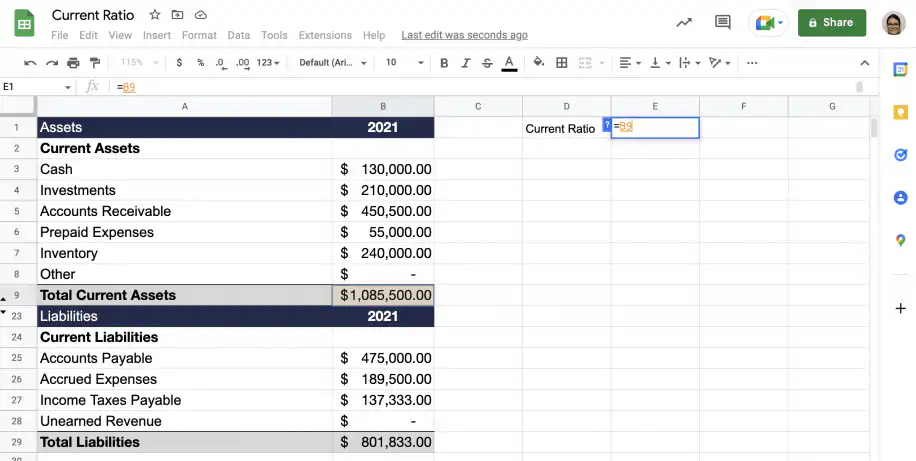
2. Add the ‘/’ sign and click on the cell with the value for total current liabilities.
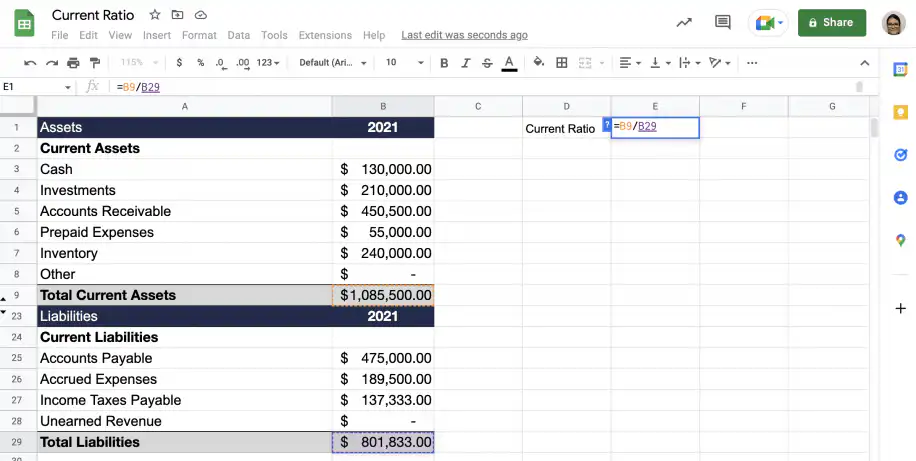
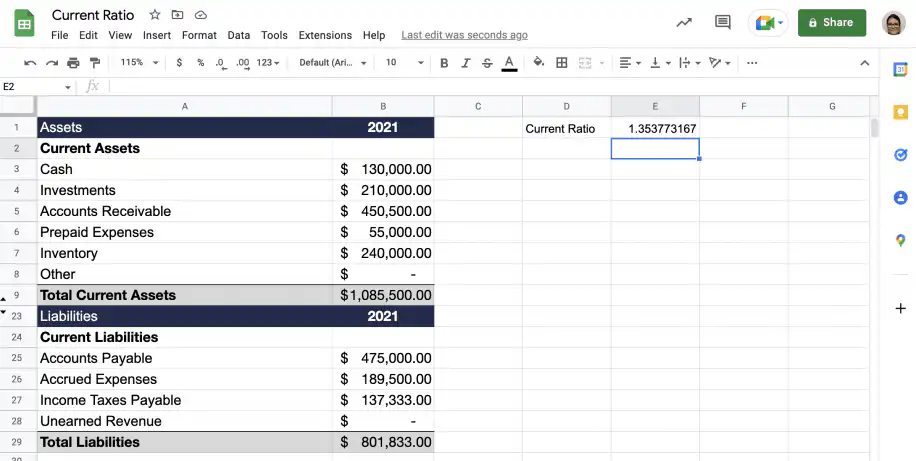
3. Press “Enter” to get the current ratio.
Conclusion
You now know how to calculate the current ratio and how to interpret its value. You also know how to add the formula to your financial statement spreadsheets to calculate it automatically. With Sheetgo’s AI finance virtual employee, you can automate the entire process, from collecting the balance sheet data to sharing the results. Automate the tedious tasks to focus on staying updated to make informed decisions.
As you have seen, the current ratio is one of various ratios commonly used by accountants and investors to evaluate a company’s financial health in terms of its liquidity. Another popular liquidity ratio is the quick ratio, which you can learn more about in our blog.
To learn more about other financial ratios and analyses, check out the articles below:


 English
 Español
 Português do Brasil
 Français