




For companies that need to manage physical inventory, such as those involved in manufacturing or retail, inventory management and control are crucial. One of the main aims of cash management is to run the company with as little cash as possible tied up in inventory or accounts receivable. In other words, you need to turn inventory into accounts receivable as soon as possible.
The cash conversion cycle (CCC) follows this process from purchasing inventory to settling accounts receivable and accounts payable. Therefore, it doesn’t apply to businesses that deal with intangible goods, as they don’t need to manage physical inventory.
In this article, you will learn about the cash conversion cycle and the formula used to calculate its value. You will also learn how to calculate the metrics used in the formula to find the number of days it takes a company to convert cash investment into sales revenue.
What is the cash conversion cycle?
The cash conversion cycle is a financial metric that expresses the number of days a business takes to convert inventory and accounts receivable into cash flows from sales. This metric only applies to companies that manage physical inventory. You should calculate the cycle for multiple periods to analyze historical variations.
For example, companies that provide software or financial services have no use for this metric because they work with intangible goods. However, if you work with tangible goods, you need inventory management and control; this metric can help you track results.
What is a good cash conversion cycle?
Generally speaking, lower values are better since they show that the business can quickly convert cash on hand into cash from sales. However, when comparing values to those of competitors, be careful to choose only similar companies in your industry, as the values can vary significantly.
Higher values may indicate that the company is not managing its cash efficiently. There are many factors that could increase this value, such as settling accounts payable too early, waiting too long to collect accounts receivable, or having a low inventory turnover ratio.
Cash conversion cycle calculations
The formula for calculating the cash conversion cycle is very straightforward. However, it involves calculating three different metrics first. Below, you have the main formula for CCC, as well as all the formulas needed to calculate the different metrics involved. In all cases, a period of 1 year (365 days) is considered. If you want to calculate it quarterly, multiply by 90 instead of 365 days.
Cash conversion cycle formula
You can use the following formula to calculate the cash conversion cycle:
CCC = DIO + DSO – DPO
where
- DIO = days of inventory outstanding
- DSO = days of sales outstanding
- DPO = days of payables outstanding
Now that you know the cash conversion cycle formula, let’s see how the required metrics are calculated.
Days of inventory outstanding
The first metric expresses the number of days it takes to turn inventory into sales. A related metric is the inventory turnover ratio. You can calculate the DIO using the following formula:
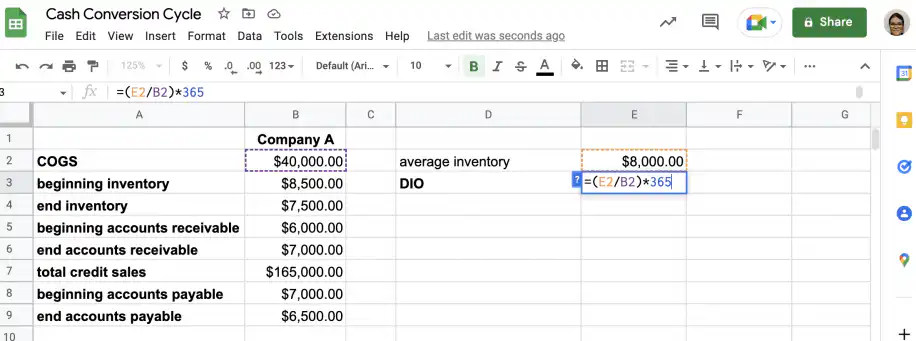
DIO = (average inventory / COGS) * 365
You can find the value for COGS on the income statement, and you can calculate the average inventory using the formula below:
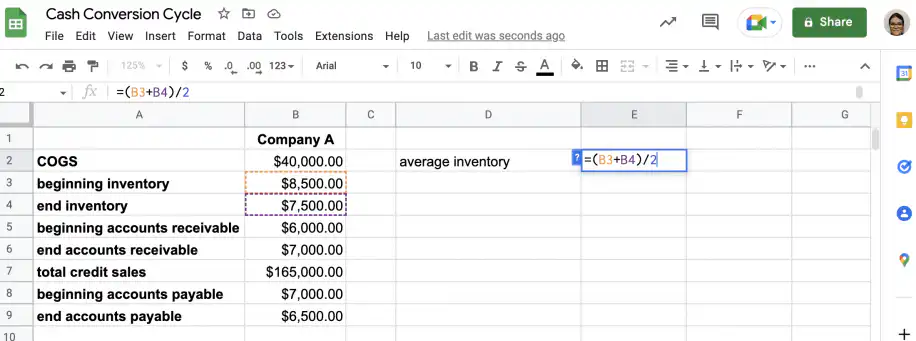
average inventory = (beginning inventory + end inventory) / 2
Days of sales outstanding
This metric provides an average for the number of days it takes to collect payment after a sale. To calculate days of sales outstanding, use the following formula:
DSO = (average accounts receivable / total credit sales) * 365
The value for average accounts receivable can be calculated using this formula:
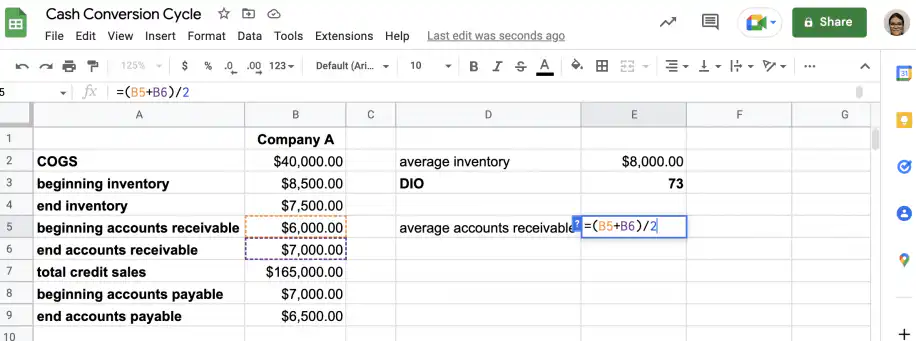
average accounts receivable = (beginning accounts receivable + end accounts receivable) / 2
Days of payables outstanding
The average number of days it takes to settle accounts payable is expressed by the days of payables outstanding metric. The formula used to calculate it is the following:
DPO = days of payables outstanding = (average accounts payable / COGS) * 365
To get the value of COGS per day, divide the COGS value for the period by the number of days in it. To find the average accounts payable, use the following formula:
average accounts payable = (beginning accounts payable + end accounts payable) / 2
How to calculate cash conversion cycle in Excel or Google Sheets?
As you have seen, the cash conversion cycle requires multiple calculations involving similar and related metrics. This can lead to becoming confused and making avoidable mistakes. Fortunately, Excel or Google Sheets can help you structure the data and automate calculations. With Sheetgo, an AI-powered data automation platform, you can save time and avoid mistakes by automating the tedious tasks in your business processes.
In the next section, you have an example of how to calculate the cash conversion cycle using Google Sheets.
Cash conversion cycle example
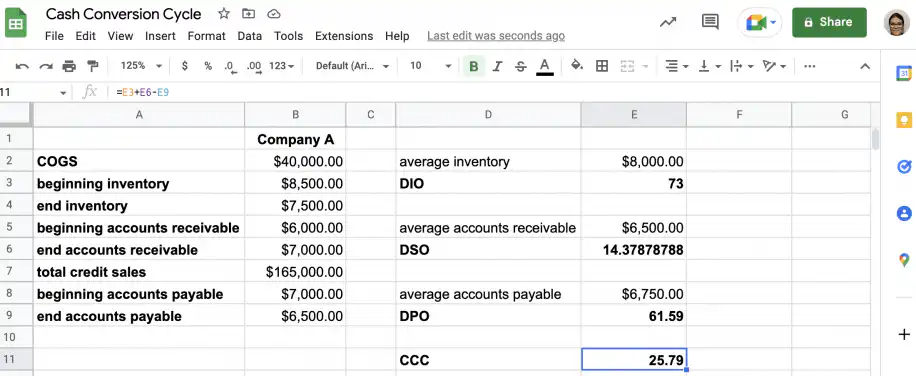
The following example is calculated based on Company A’s data for a period of 1 year.
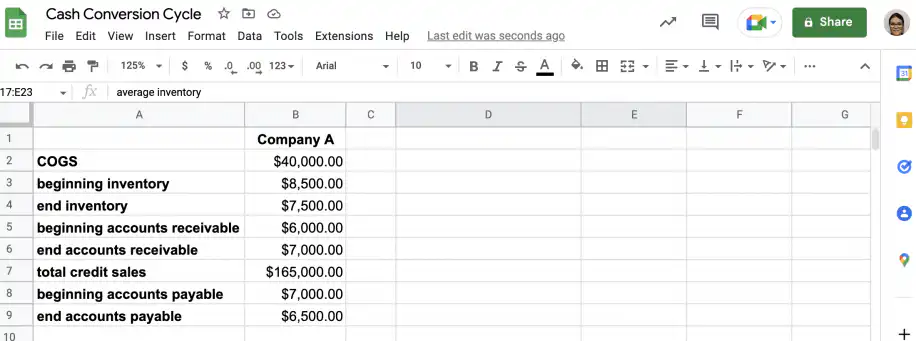
1. Gather data
In Google Sheets, set up a table with the data you’ll need, as shown in the screenshot below.
2. Calculate the days of inventory outstanding
To find the DIO, you first need to calculate the average inventory.
Once you have the average inventory, type the formula for DIO in an empty cell.
3. Calculate the days of sales outstanding
For the DSO, first, calculate the average accounts receivable.
Once you know the value for average accounts receivable, you can calculate the DSO.
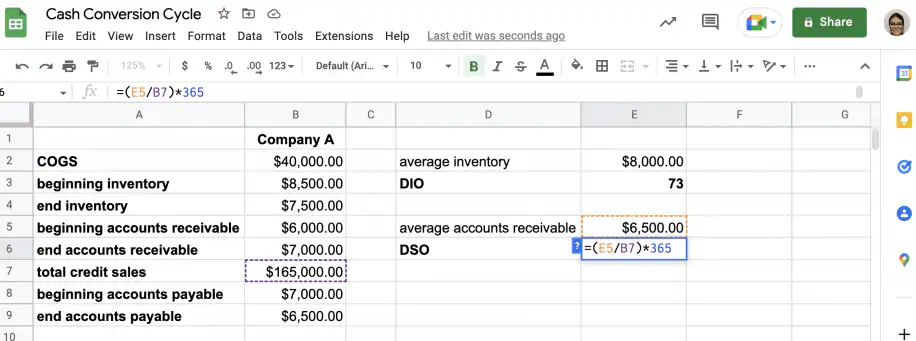
4. Calculate the days of payables outstanding
Just like with the other metrics, you’ll have to calculate the average accounts payable before calculating the DPO.
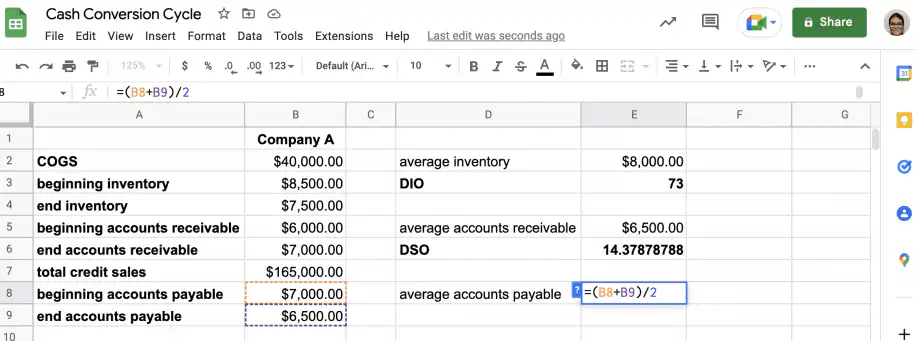
Next, type the formula for DPO.
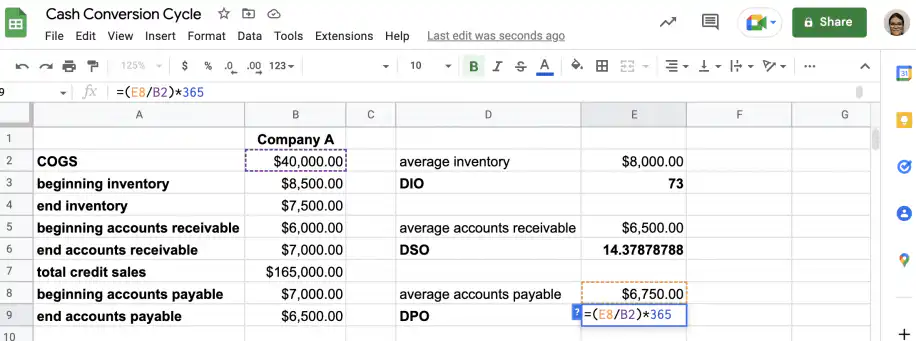
5. Calculate the cash conversion cycle
Now that you know the values for DIO, DSO, and DPO, you can type the formula for calculating the cash conversion cycle in an empty cell.
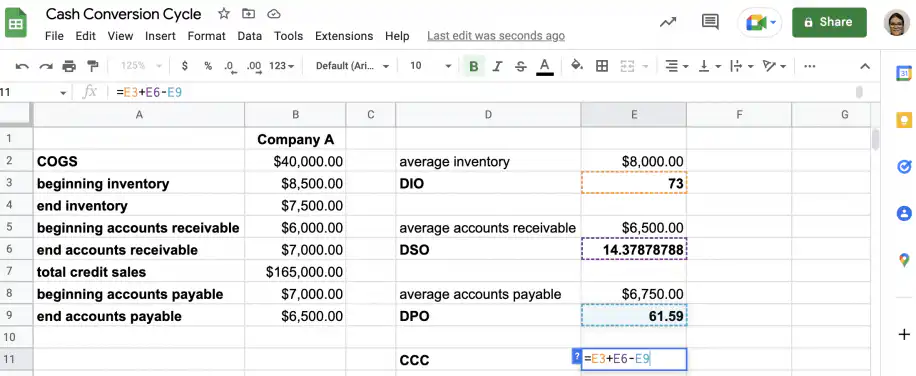
That’s it. The cash conversion cycle takes approximately 26 days for Company A.
Conclusion
You now know about the cash conversion cycle and what it can tell you about a company’s cash management and liquidity. A low value indicates that the company manages its cash effectively. You can obtain a lower value through different methods, but it helps to collect on accounts receivable promptly while deferring slightly on accounts payable.
Finally, you also know that a single value for this metric can’t tell you very much. To get valuable insights, you should calculate it periodically and compare these values to those of similar companies in the industry. It also helps to track the CCC alongside operating cash flow and the current ratio. You can quickly set up the required calculations in Google Sheets or Excel, following the steps in the examples. If your finance team pulls these figures from several spreadsheets, Sheetgo’s AI finance virtual employee can gather the numbers and keep your reports up to date.


 English
 Español
 Português do Brasil
 Français