


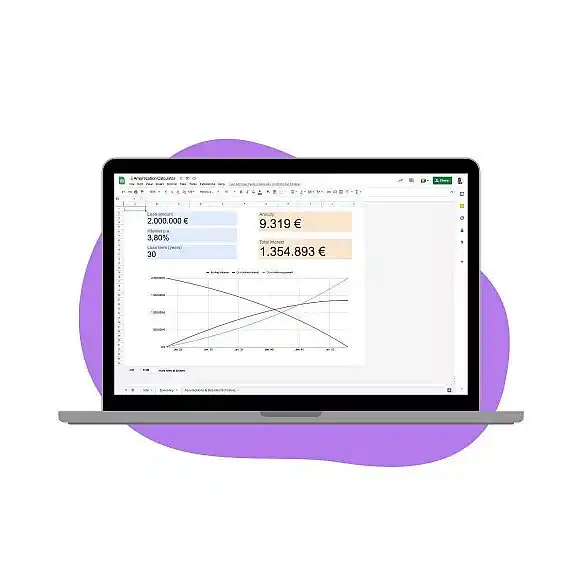

A loan amortization calculator template in Google Sheets generates an amortization schedule. It shows the principal and interest portion of each payment, along with the remaining balance after every payment is made. You can build one with four inputs and four formulas.
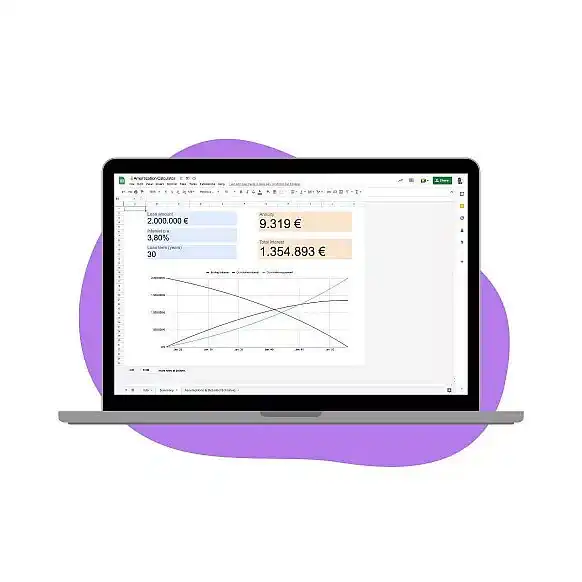
A loan amortization calculator template helps you:
- Define the loan’s key parameters (loan amount, interest rate, loan term & start date).
- Create a detailed amortization schedule, showing loan balance, interest, and repayment on a monthly basis.
- Maintain an overview of both key assumptions and key outcome (annuity and total interest payment).
What is an amortization schedule?
An amortization schedule is a table showing each loan payment over time. It lists the remaining balance after each payment and the amount of interest paid over the life of the loan. The schedule typically includes information about the original loan amount, interest rate, length of the repayment period, and other details. An amortization schedule can be used to compare different loans and determine which one will provide the best overall savings.
What is included in a loan amortization schedule?
The schedule typically shows the principal and interest portion of each payment. This information can be valuable in understanding how a loan works and seeing how quickly it is paid off. The amounts listed on an amortization schedule are also helpful when budgeting and planning for future payments.
An amortization schedule can also be used to calculate the total amount of interest paid over the life of the loan. This can be especially helpful in understanding how much a borrower will pay for a loan over time. When making financial decisions, it is essential to consider the total cost of a loan before making any commitments. An amortization schedule can help borrowers make informed decisions and maximize their savings.
By understanding how an amortization schedule works, lenders and borrowers can make better financial decisions. Having access to this information provides transparency and can help borrowers save money over the life of their loan.
How to calculate an amortization schedule?
An amortization schedule can be calculated using several different formulas. Generally, the amount of interest paid for each payment is calculated based on the remaining balance of the loan and the interest rate. The principal portion of each payment is then subtracted from the total amount due to see how much will be paid in that period.
The exact formula for calculating an amortization schedule will depend on the type of loan. Some lenders may have their own formula or use a standardized one. It is crucial to understand the specific calculations used before making any commitments.
How to make an amortization schedule?
Creating an amortization schedule is relatively straightforward. First, the borrower must input information about the loan into a simple calculator or spreadsheet, including the loan amount, interest rate, and repayment period. The calculator will then generate a table displaying the principal and interest portion of each payment, along with the remaining balance after every payment is made.
An amortization schedule can also be created manually using a pen and paper. To do this, multiply the remaining balance by the periodic interest rate to get the interest due for that payment. Subtract the interest from the fixed payment to see how much goes toward the principal, then subtract that principal from the balance and repeat for the next payment.
How to build a loan amortization schedule in Google Sheets
The template in the screenshot above works out a 2,000,000 loan at 3.80% over 30 years. It returns a monthly payment of 9,319 and 1,354,893 in total interest. To build the same schedule, enter the inputs in column B:
- B1: the loan amount, for example 2,000,000.
- B2: the annual interest rate, for example 3.8%.
- B3: the loan term in years, for example 30.
- B4: the date of the first payment.
Add the headers No., Date, Payment, Interest, Principal, and Balance in row 6. Then add these formulas in row 7:
- A7, the payment number: 1.
- B7, the payment date: =EDATE($B$4,A7-1)
- C7, the monthly payment: =PMT($B$2/12,$B$3*12,-$B$1) returns 9,319.15.
- D7, the interest part: =IPMT($B$2/12,A7,$B$3*12,-$B$1) returns 6,333.33 in the first month.
- E7, the principal part: =PPMT($B$2/12,A7,$B$3*12,-$B$1) returns 2,985.81.
- F7, the remaining balance: =$B$1-SUM($E$7:E7) returns 1,997,014.19.
Enter =A7+1 in A8 and copy it down to row 366. Copy B7:F7 down to row 366 as well, which gives you all 360 monthly payments. The balance reaches 0 in the last row, and =SUM(D7:D366) returns the total interest.
Each month, interest is charged on the remaining balance. So the interest part shrinks and the principal part grows, while the payment stays the same. Our guides to the PMT formula in Google Sheets and the PPMT formula in Google Sheets explain each argument. The EDATE formula moves each payment date forward by one month.
What is a loan amortization calculator?
A loan amortization calculator is a tool that can be used to quickly and accurately calculate an amortization schedule. These calculators are available online or as apps on mobile devices, making them easy to access.
Loan amortization calculators can be a valuable tool for borrowers and lenders alike. They make it easy to understand how the loan works and how much will be paid in total. Borrowers can use the calculator to plan their budgets and make informed decisions about their loans.
What is a loan amortization calculator template?
A loan amortization calculator template is a pre-made spreadsheet that can be used to quickly and accurately calculate an amortization schedule. These templates are available online and can be customized to fit the user’s specific needs.
The template will require the user to input information about the loan, such as the amount borrowed, interest rate, repayment period, and other details. The calculator will then generate a table displaying the principal and interest portion of each payment, along with the remaining balance after every payment is made.
In conclusion, an amortization schedule is a helpful tool for understanding how a loan is structured and what the total cost of the loan will be over time. It can provide valuable information that helps lenders and borrowers make informed decisions about their loans. An amortization schedule can help borrowers save money by understanding the total cost of a loan and make better financial decisions.
For more ready-made spreadsheets, see our top 5 free finance templates in Google Sheets. If your loan payments and balances feed other reports, Sheetgo’s AI finance virtual employee can collect them into one spreadsheet and keep the figures current.




 English
 Español
 Português do Brasil
 Français