


No matter the size of your business, spreadsheets are a simple and flexible tool to track and manage inventory. Luckily, there are plenty of Excel inventory templates to get you started.
Whether you run a retail store, a restaurant, or a factory, keeping track of inventory manually is a huge chore. With spreadsheets, you can digitize your inventory and sales systems quickly and easily.
Although some large companies prefer to use specialist inventory software, these programs can be expensive and overly complicated for SMEs.
Excel is an affordable and straightforward solution for stock management. On top of that, it’s a piece of software that your team probably uses on a daily basis.
It’s not easy to know where to begin when faced with a blank spreadsheet. So we’ve pulled together the 10 best Excel templates to keep an inventory log and monitor stock levels.
Top Excel inventory templates
1. Inventory management template by Sheetgo
This spreadsheet template from the no-code platform Sheetgo is an automated system containing pre-built functions.
This inventory template gives you:
- Accurate inventory data. Keep tabs on every item checked in or out and avoid overselling.
- Scalability. Just create more files as your business grows.
- Integration. Easily link your inventory to other company processes, such as your accounting, procurement, or sales spreadsheets
2. Inventory analysis template
Vend offers a great Excel template that’s free to download and use. The template has clear instructions on how to set up and use the system. It teaches you how to manage the sales tables and calculate metrics within the workbook.
Use this template to track metrics like the cost of goods sold (COGS), inventory turnover rate, sell-through percentage, and conversion rates.
All of the formulas are pre-entered for you, so just type in your data and see the results.
Get the template from Vend.

3. Excel inventory by Excel Skills
Excel Skills offers more than 40 premium templates, including three designed just for managing inventory processes. These templates aren’t free, but they’re high quality, unique, and come with extensive built-in training resources.
This particular template includes 5 inventory pages to track stock usage and movement.
You can download a sample template from the following link: Excel inventory template by Excel Skill.

4. Stock inventory control
This Stock Inventory Control template is created by Vertex42, one of the leading spreadsheet template resources on the web. The majority of their templates are for Excel but they’ve recently started adding some great templates for Google Sheets too.
This template will help you update and manage your stock levels and keep track of all your supplier information. It also contains a count sheet and an inventory label template. This multi-worksheet template is only available for Excel.
Get the template directly from Stock Inventory Control.

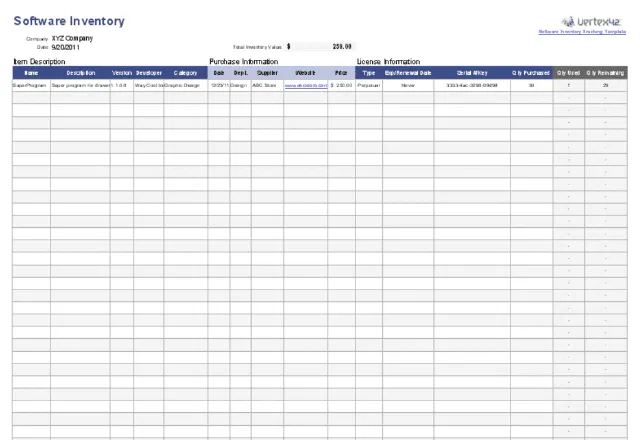
5. Software Inventory Tracking
Here’s another great template offered by Vertex42. It’s a software inventory tracker that’s perfect for companies with multiple users and licenses.
You can track the location of IT hardware, and monitor software information, purchase, and license details. What’s best, this template is completely free to download and use.
Get the template here: Software Inventory Tracking.
6. Inventory and stock management
Zervant is a well known invoicing company based in the UK. They provide some free, easy to use templates on their blog. One of these is a 3-page inventory and stock management template.
This inventory tracker template includes daily stocktake, stock inventory, and stock database tabs. It also provides really clear instructions on how to use it.
Get the template here: Inventory and Stock Management.

7. Food stocktake template
This unique template from Spreadsheet123 is designed to help restaurants and cafeterias manage food stock and sales information.
This food inventory spreadsheet provides an overview of the cost of goods sold. But it doesn’t stop there, it also calculates gross profit margin and variance.
Depending on which country you are based in, you can adjust the settings for local tax rates. In addition, it has customizable currency, text, and measurement settings.
Get the free template: Food Stocktake Template.

8. Excel inventory template
The Intuit Quickbooks inventory management spreadsheet is free to use and comes with some great tips on managing your inventory using Excel.
This product inventory tracker also has information on purchases and sales. It even allows you to view your data in a beautiful report within the dashboard right in the workbook. It’s also available in Google Sheets and Numbers for Mac.
Get the template: Excel Inventory Template.

9. Beverage Stocktake Pro Template
If you run a bar, pub, club, or restaurant, this is one of the best beverage inventory spreadsheet templates out there.
This bar inventory spreadsheet template tracks drinks purchase costs, actual revenue, and gross profit and loss on a weekly basis. It even compares specific volumes against sales to calculate profits more accurately.
It costs $39.95, however, you can download a locked version to try it out before you make the purchase. The one-time purchase is good for life and includes free updates and technical support.
Get the template: Beverage Stocktake Template.

10. Inventory management template
This inventory template from Excel Champs is easy to use. It comes in two packages: a free Lite Version, and a paid Pro Version. Both of them have a sleek dashboard and a check in, check out sheet. The Pro version allows you to manage returns and generate invoices and supplier reports.
This template contains macros, so make sure you enable them in Excel before using it.
Get the template: Inventory Management Template.

Easy inventory management in spreadsheets
Although inventory software has its perks, many companies simply don’t need the kind of features that come with complex inventory management programs.
If you’ve never created your own system from scratch, however, it’s tricky to know where to start.
Fortunately, there’s a ton of great inventory Excel templates out there to get you started. With pre-written formulas and ready-made dashboards, they give you the framework to build an inventory solution that works for your business.
With this selection of top 10 inventory Excel templates, we hope you’ve been able to find the right system for your company.
Automate your entire business in spreadsheets
Did you know that you can manage your entire company’s data in connected spreadsheets? Try Sheetgo’s automated cash flow template or budget vs actual template.


 English
 Español
 Português do Brasil
 Français