Get help

Help center

Guides and answers

Contact support

Write to our team

Sign in to

Workflows

Build processes with your team

Automations

Connect files and automate tasks

One system, four parts

AI agents

Virtual Employees that work 24/7

Automations

Connect files and automate tasks

Workflows

Build processes with your team

Data Space

Trusted data sharing and control

Solutions by department

Finance

Reports, budgets, and reconciliations

Inventory and manufacturing

Stock, orders, and production in one view

HR

Timesheets, attendance, and reviews

Project management

Status and workload across projects

Sales and CRM

Leads and deals kept up to date

Education

Student records and school data

Finance

Turn manual finance work into reports that update themselves.

What Finance teams automate

  • Track payables and receivables
  • Build cash flow statements
  • Compare budget against actuals

Inventory and manufacturing

See stock levels and automate ordering.

What inventory and manufacturing teams automate

  • Track inventory across multiple sites
  • Connect sales, purchasing, and warehouse data
  • Link a barcode scanner to your sheet

HR

Run recruitment, attendance, and OKR tracking from your sheets.

What HR teams automate

  • Track recruitment and onboarding
  • Record team OKRs and results
  • Track check-ins, check-outs, and leave

Project management

Assign tasks and track hours without manual updates.

What project teams automate

  • Assign tasks and track status changes
  • Estimate effort and log hours worked
  • Track milestones across projects

Sales and CRM

Track leads and sales performance with automated reports.

What sales teams automate

  • Track and convert leads
  • Set sales goals and track team metrics
  • Monitor sales KPIs on dashboards

Education

Automate attendance, grades, and school purchasing.

What schools automate

  • Track attendance and notify parents
  • Record and compare class grades
  • Track inventory lent to students and staff

Find a use case

By department

How each team uses Sheetgo

By industry

How each industry uses Sheetgo

By company size

Small, medium-sized, or large

Learn

Blog

Guides and product news

Customer stories

How teams like yours use Sheetgo

Help center

Guides and answers

Why Sheetgo

Compare

How Sheetgo compares with other tools

Security

How we protect your data

Trust center

Our compliance details

Sign in to

Workflows

Build processes with your team

Automations

Connect files and automate tasks

One system, four parts

AI agents

Virtual Employees that work 24/7

Automations

Connect files and automate tasks

Workflows

Build processes with your team

Data Space

Trusted data sharing and control

Solutions by department

Finance

Reports, budgets, and reconciliations

Inventory and manufacturing

Stock, orders, and production in one view

HR

Timesheets, attendance, and reviews

Project management

Status and workload across projects

Sales and CRM

Leads and deals kept up to date

Education

Student records and school data

Find a use case

By department

How each team uses Sheetgo

By industry

How each industry uses Sheetgo

By company size

Small, medium-sized, or large

Get started

Templates

Ready-made workflows to start from

Learn

Blog

Guides and product news

Customer stories

How teams like yours use Sheetgo

Help center

Guides and answers

Why Sheetgo

Compare

How Sheetgo compares with other tools

Security

How we protect your data

Trust center

Our compliance details

Help center

Guides and answers

Contact support

Write to our team

Workflows

Build processes with your team

Automations

Connect files and automate tasks

How to use the NORMSDIST formula in Google Sheets

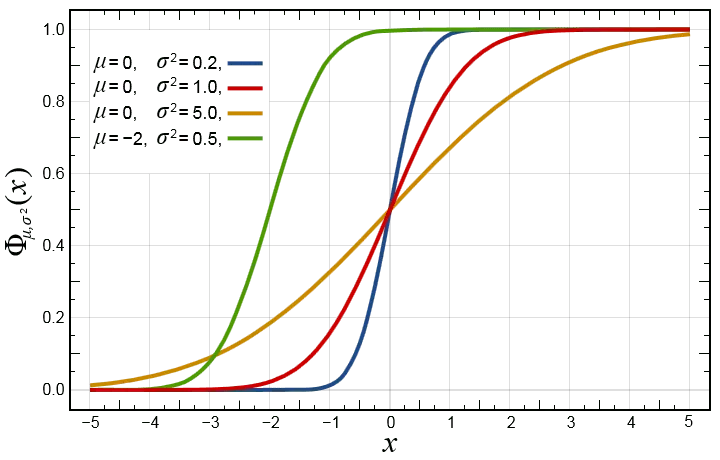
In this post, learn how to calculate the normal cumulative distribution by using the NORMSDIST formula in Google Sheets. The normal cumulative distribution is one of the most widely used probability distributions in statistics. We can derive a specialized case of normal cumulative distribution when mean is zero and the variance is 1. This is called the standard normal cumulative distribution function. Here’s how the function looks like when we plot it on the graph – the red curve is what we have been talking about.
NORMSDIST Formula

Now, if we were to know the value of the standard normal cumulative distribution function against the normally distributed variable (x), we can use the NORMSDIST formula in Google Sheets.


Syntax

NORMSDIST(x)

  • x – is the input value or cell reference that we pass to the standard normal cumulative distribution function.

The formula has one of the simplest syntaxes in all of Google Sheets. All it takes is the value of one single parameter, and it returns the value of the standard normal cumulative distribution function corresponding to that input value.

Usage: NORMSDIST formula in Google Sheets

Now that we learned the syntax, let us practically apply the formula in Google Sheets application. And we may compare the graph with that of the output values. Please have a look at the following snapshot.

NORMSDIST Formula: Usage

Like most other Google Sheets formulas, the NORMSDIST formula also is capable of accepting direct numeric values. And also references to the cells consisting of these numeric values. The first example has an input that is a direct numeric value. Whereas all other examples have cell references for its input.

Now let’s observe the output values the formula returned. If we made a quick comparison of the output values against those in the graph, it certainly looks the same. We can get a little creative and try to plot these output values on a graph using Google Sheets charts. And here’s how it looks like.

NORMSDIST Formula in Google Sheets

Without a doubt, it does resemble the red curve graph shown in the very first image.

This is how you use the NORMSDIST formula in Google Sheets. Note that there is also a way to do the opposite. That is to find the value of the distributed variable, given the value of the distribution itself. The NORMSINV formula in Google Sheetshelps us achieve this calculation.

You may also like…

google sheets features and formulas

How to find nominal interest rate using Google Sheets

Sarah is a young professional making significant financial decisions. From credit cards to mortgages, student loans, and investment...
google sheets features and formulas

Pull Google Calendar data into Google Sheets using Apps Script

This post was originally published in our community forum. Objective : This guide demonstrates how to use Google Apps Script to pull data...
google sheets features and formulas

Using the PROPER function to capitalize the first letter of each word in Google Sheets

Note: This post was originally published in our community forum. Ever found yourself needing to clean up a list of names, titles, or any...