Get help

Help center

Guides and answers

Contact support

Write to our team

Sign in to

Workflows

Build processes with your team

Automations

Connect files and automate tasks

One system, four parts

AI agents

Virtual Employees that work 24/7

Automations

Connect files and automate tasks

Workflows

Build processes with your team

Data Space

Trusted data sharing and control

Solutions by department

Finance

Reports, budgets, and reconciliations

Inventory and manufacturing

Stock, orders, and production in one view

HR

Timesheets, attendance, and reviews

Project management

Status and workload across projects

Sales and CRM

Leads and deals kept up to date

Education

Student records and school data

Finance

Turn manual finance work into reports that update themselves.

What Finance teams automate

  • Track payables and receivables
  • Build cash flow statements
  • Compare budget against actuals

Inventory and manufacturing

See stock levels and automate ordering.

What inventory and manufacturing teams automate

  • Track inventory across multiple sites
  • Connect sales, purchasing, and warehouse data
  • Link a barcode scanner to your sheet

HR

Run recruitment, attendance, and OKR tracking from your sheets.

What HR teams automate

  • Track recruitment and onboarding
  • Record team OKRs and results
  • Track check-ins, check-outs, and leave

Project management

Assign tasks and track hours without manual updates.

What project teams automate

  • Assign tasks and track status changes
  • Estimate effort and log hours worked
  • Track milestones across projects

Sales and CRM

Track leads and sales performance with automated reports.

What sales teams automate

  • Track and convert leads
  • Set sales goals and track team metrics
  • Monitor sales KPIs on dashboards

Education

Automate attendance, grades, and school purchasing.

What schools automate

  • Track attendance and notify parents
  • Record and compare class grades
  • Track inventory lent to students and staff

Find a use case

By department

How each team uses Sheetgo

By industry

How each industry uses Sheetgo

By company size

Small, medium-sized, or large

Learn

Blog

Guides and product news

Customer stories

How teams like yours use Sheetgo

Help center

Guides and answers

Why Sheetgo

Compare

How Sheetgo compares with other tools

Security

How we protect your data

Trust center

Our compliance details

Sign in to

Workflows

Build processes with your team

Automations

Connect files and automate tasks

One system, four parts

AI agents

Virtual Employees that work 24/7

Automations

Connect files and automate tasks

Workflows

Build processes with your team

Data Space

Trusted data sharing and control

Solutions by department

Finance

Reports, budgets, and reconciliations

Inventory and manufacturing

Stock, orders, and production in one view

HR

Timesheets, attendance, and reviews

Project management

Status and workload across projects

Sales and CRM

Leads and deals kept up to date

Education

Student records and school data

Find a use case

By department

How each team uses Sheetgo

By industry

How each industry uses Sheetgo

By company size

Small, medium-sized, or large

Get started

Templates

Ready-made workflows to start from

Learn

Blog

Guides and product news

Customer stories

How teams like yours use Sheetgo

Help center

Guides and answers

Why Sheetgo

Compare

How Sheetgo compares with other tools

Security

How we protect your data

Trust center

Our compliance details

Help center

Guides and answers

Contact support

Write to our team

Workflows

Build processes with your team

Automations

Connect files and automate tasks

Net book value: formula and examples

Over time, assets lose some or all of their value through depreciation or amortization. The current value of these assets obviously has an impact on the value of the company itself. Net Book Value expresses the historical value of an asset after deducting the corresponding accumulated depreciation or amortization.

In this article, you will learn about Net Book Value and why it matters. You will also learn how Net Book Value is calculated, as well as how to use the formula to calculate Net Book Value with step-by-step instructions and examples.

What is net book value?

Net Book Value (NBV) refers to the historical value of an asset after subtracting accumulated depreciation or amortization – depending on the asset type – from the original cost. It is used to determine the value of a company’s assets and is an important aspect of financial reporting. It is also the value each asset carries on the balance sheet.

The Net Book Value does not necessarily reflect the market value of the asset at any point. Once the asset’s useful life is at an end, its Net Book Value should be an approximate match for its salvage value, if any.

How to calculate net book value?

Net Book Value is calculated by subtracting cumulative depreciation from the original cost of the asset. Cumulative depreciation or amortization refers to the value obtained by multiplying the yearly value by the number of years you have owned the asset.

Net book value formula

To calculate the Net Book Value of an asset, use the following formula:

net book value = original asset cost – accumulated depreciation/amortization

Depreciation applies to tangible assets with a useful life greater than one year. A percentage of the asset’s price at purchase is deducted periodically over the course of its useful life. The asset’s value at the end of its useful life will be approximately its salvage value if it has any. To calculate accumulated depreciation using the straight-line method, use the formula below.

accumulated depreciation = ((original cost – salvage value) / useful life) * years in use

In this context, amortization is very similar to depreciation, but it applies to intangible assets, like software, patents, or trademarks.

accumulated amortization = ((original cost – residual value) / useful life) * years consumed

How is net book value calculated in Google Sheets?

You can easily calculate the Net Book Value of your assets in Google Sheets. Below, you have step-by-step instructions on how to calculate Net Book Value in Google Sheets for two different types of assets. If you need a refresher on the basics, see how to subtract in Google Sheets.

Calculate net book value using accumulated depreciation

Imagine your company purchased a truck 5 years ago. The original cost was $100,000, the truck has a useful life of 10 years, and its salvage value is $20,000. Follow the steps below to calculate the current Net Book Value for the truck.

1. In Sheets, input the relevant values into separate cells.
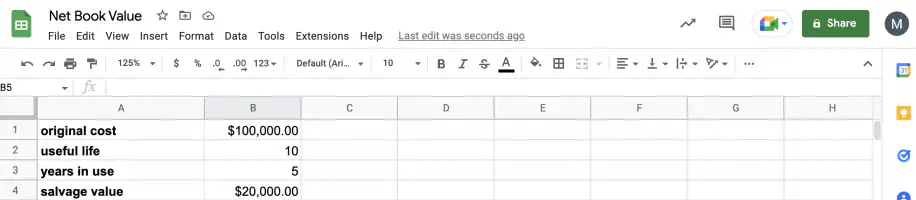
Net book value formula — truck original cost, useful life, years in use, and salvage value in Google Sheets

2. Type in the formula using the cell references from the previous step. You can calculate cumulative depreciation directly or first calculate yearly depreciation like below.
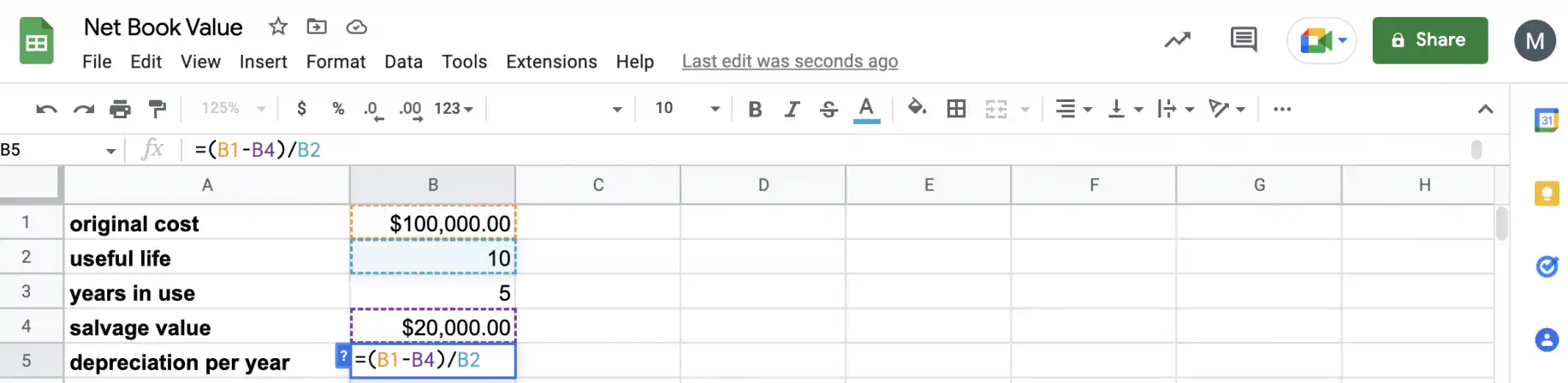
Net book value formula — =(B1-B4)/B2 in cell B5 calculates depreciation per year

3. Multiply the yearly depreciation by the number of years that the asset has been in use to get the accumulated depreciation.
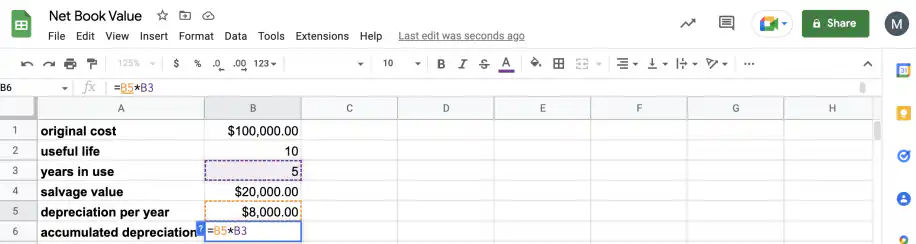
Net book value formula — =B5*B3 in cell B6 multiplies yearly depreciation by years in use

4. In a separate cell, type in the formula for the Net Book Value.
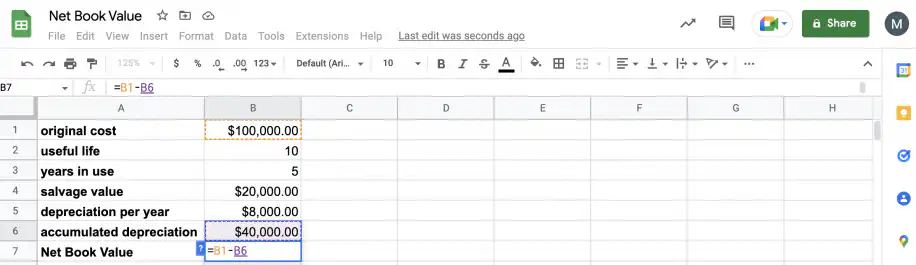
Net book value formula — =B1-B6 in cell B7 subtracts $40,000 accumulated depreciation from $100,000

5. That’s it. The Net Book Value of the truck after 5 years is $60,000.
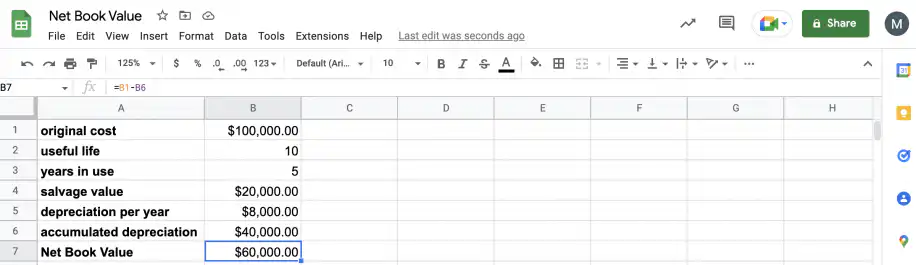
Net book value of the truck — $60,000 in cell B7 of the Google Sheets example

Calculate net book value using accumulated amortization

Imagine your company purchased scheduling software for $10,000 2 years ago. The software has a useful life of 5 years but no residual value at the end of its life.

1. In Sheets, input the relevant values into separate cells.
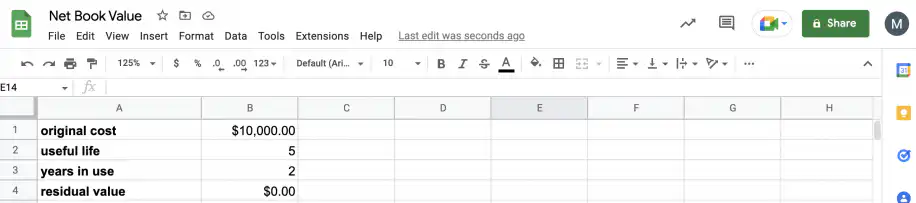
Net book value formula — software original cost $10,000, 5-year useful life, 2 years in use, $0 residual value

2. Type in the formula using the cell references from the previous step. You can calculate accumulated amortization directly or first calculate yearly amortization like below.
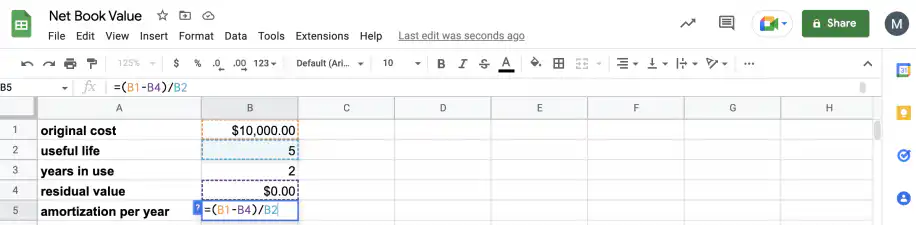
Net book value formula — =(B1-B4)/B2 in cell B5 calculates amortization per year

3. Multiply the yearly amortization by the number of years that the asset has been in use to get the accumulated amortization.
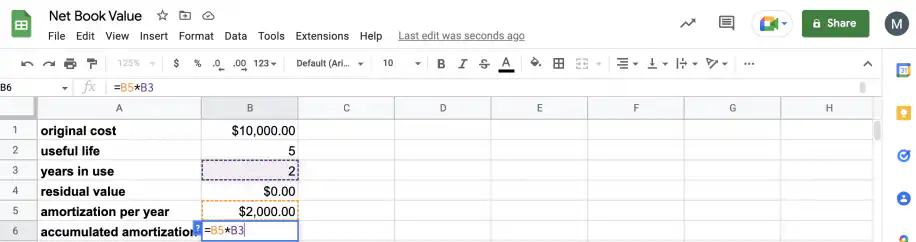
Net book value formula — =B5*B3 in cell B6 calculates $4,000 accumulated amortization

4. In a separate cell, type in the formula for the Net Book Value.
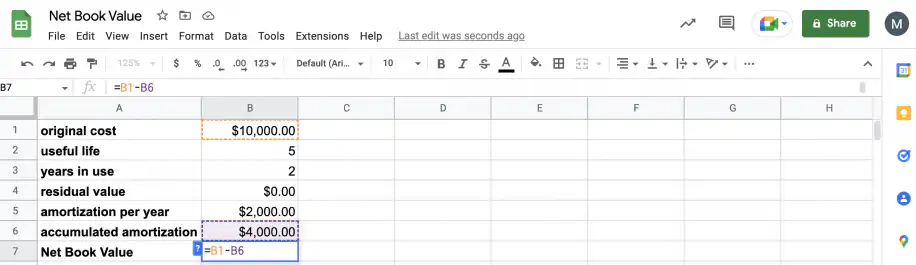
Net book value formula — =B1-B6 in cell B7 subtracts accumulated amortization from the original cost

5. That’s it! You have the Net Book Value for the software after two years: $6,000.
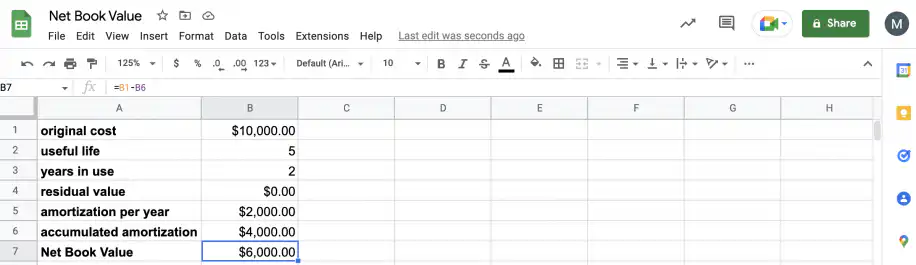
Net book value of the software — $6,000 in cell B7 of the Google Sheets example

Conclusion

As you have seen, Net Book Value is an important concept in financial reporting. Assets lose most or all of their value with the passage of time, so it’s important that this be accurately reflected in the books to provide an accurate picture of what the business is worth. However, just like with many aspects of financial reporting, it relies on estimates, such as an asset’s useful life and salvage value. In other words, the accuracy and usefulness of this measure will depend on the reliability of the information it’s based on.

You now know about Net Book Value and how it is calculated for different types of assets. You also know how to calculate Net Book Value in Google Sheets, so you can easily repeat your Net Book Value calculations using accumulated depreciation or accumulated amortization.

When your asset register is spread across several spreadsheets, Sheetgo’s AI finance virtual employee can collect the figures and keep your net book value calculations up to date.

● Available 24/7

Put Owen on your finance ops

Sheetgo's finance virtual employee keeps your numbers current and your reporting on time. Your data stays in Google Sheets; you work with Owen in Slack, Teams, or Google Chat.

You may also like…

simple finance add on featured image

Build a stock portfolio spreadsheet, track your investments

Staying on top of your investments can be a real challenge, particularly if you manage them through many brokers. In this post we will...
finance

How to use Google Sheets for currency conversion

Staying up to date with the latest conversion rates can be a daunting task. But it doesn’t have to be. Read on to learn how to use Google...
finance processes and templates

8 steps to prepare a bank reconciliation statement

Bank reconciliation is a crucial financial process for businesses to ensure that records match bank statements. In this post, we'll...