
Get help

Help center

Guides and answers

Contact support

Write to our team

Sign in to

Workflows

Build processes with your team

Automations

Connect files and automate tasks

One system, four parts

AI agents

Virtual Employees that work 24/7

Automations

Connect files and automate tasks

Workflows

Build processes with your team

Data Space

Trusted data sharing and control

Solutions by department

Finance

Reports, budgets, and reconciliations

Inventory and manufacturing

Stock, orders, and production in one view

HR

Timesheets, attendance, and reviews

Project management

Status and workload across projects

Sales and CRM

Leads and deals kept up to date

Education

Student records and school data

Finance

Turn manual finance work into reports that update themselves.

What Finance teams automate

  • Track payables and receivables
  • Build cash flow statements
  • Compare budget against actuals

Inventory and manufacturing

See stock levels and automate ordering.

What inventory and manufacturing teams automate

  • Track inventory across multiple sites
  • Connect sales, purchasing, and warehouse data
  • Link a barcode scanner to your sheet

HR

Run recruitment, attendance, and OKR tracking from your sheets.

What HR teams automate

  • Track recruitment and onboarding
  • Record team OKRs and results
  • Track check-ins, check-outs, and leave

Project management

Assign tasks and track hours without manual updates.

What project teams automate

  • Assign tasks and track status changes
  • Estimate effort and log hours worked
  • Track milestones across projects

Sales and CRM

Track leads and sales performance with automated reports.

What sales teams automate

  • Track and convert leads
  • Set sales goals and track team metrics
  • Monitor sales KPIs on dashboards

Education

Automate attendance, grades, and school purchasing.

What schools automate

  • Track attendance and notify parents
  • Record and compare class grades
  • Track inventory lent to students and staff

Find a use case

By department

How each team uses Sheetgo

By industry

How each industry uses Sheetgo

By company size

Small, medium-sized, or large

Get started

Templates

Ready-made workflows to start from

Learn

Blog

Guides and product news

Customer stories

How teams like yours use Sheetgo

Help center

Guides and answers

Why Sheetgo

Compare

How Sheetgo compares with other tools

Security

How we protect your data

Trust center

Our compliance details

Sign in to

Workflows

Build processes with your team

Automations

Connect files and automate tasks

One system, four parts

AI agents

Virtual Employees that work 24/7

Automations

Connect files and automate tasks

Workflows

Build processes with your team

Data Space

Trusted data sharing and control

Solutions by department

Finance

Reports, budgets, and reconciliations

Inventory and manufacturing

Stock, orders, and production in one view

HR

Timesheets, attendance, and reviews

Project management

Status and workload across projects

Sales and CRM

Leads and deals kept up to date

Education

Student records and school data

Find a use case

By department

How each team uses Sheetgo

By industry

How each industry uses Sheetgo

By company size

Small, medium-sized, or large

Get started

Templates

Ready-made workflows to start from

Learn

Blog

Guides and product news

Customer stories

How teams like yours use Sheetgo

Help center

Guides and answers

Why Sheetgo

Compare

How Sheetgo compares with other tools

Security

How we protect your data

Trust center

Our compliance details

Help center

Guides and answers

Contact support

Write to our team

Workflows

Build processes with your team

Automations

Connect files and automate tasks

Archie Ives

Data Entry Specialist
● Available 24/7

Archie Ives, AI data entry virtual employee

Data entry that keeps up with arrivals.

Meet Archie Ives — Hand Archie the data entry and it stays handed over. He handles document management: he reads documents arriving by chat or email, extracts their data, keeps the organization’s master register current, files each one under the right name, and chases what’s missing so the team doesn’t have to. He works in the spreadsheets the team already uses and asks a person before anything consequential. Technically he’s an AI agent – but one with a job description: a name, a CV, and a role the team manages.

Ask us for his CV and we’ll send it over.

SOC 2 (Type II), GDPR, CASA tier 3 Compliant

Trusted by companies large and small

Spotify
Red Hat
Canva
PepsiCo
Google
Nvidia
Booking.com
DoorDash
Uber
eBay
Yelp
Amplitude

What the team can delegate to Archie

One virtual employee across the whole data entry cycle

Capture and extract

  • •Capture documents from chat and email
  • •Extract data from scanned documents with OCR
  • •Read PDF, XLSX, DOCX, and CSV files
  • •Normalize mixed documents into one registry

File and track

  • •Route each document to the right Drive folder
  • •Apply file naming and versioning conventions
  • •Keep each file’s status and assigned person current
  • •Chase missing documents for the team

Consolidate and deliver

  • •Consolidate incoming records into one master file
  • •Split each person’s records into their spreadsheet
  • •Generate filtered PDF packs and deliver them by email
  • •Pull data from your organization’s systems through APIs and webhooks

909

organizations he learned data entry from

72

industries

24/7

on duty

11

years in the field

How the team works with him

Talk to him where your organization already works

No new app to open. Archie joins the chat tools the team already uses — assign work in plain language, and he reports back, asking a human’s approval before anything consequential. Archie arrives knowing his job, so the team doesn’t need to learn prompts; it reviews what he flags and approves what matters, just as it would with anyone reporting to it.

Works with
Slack, Gemini Enterprise, Google Chat, and more.
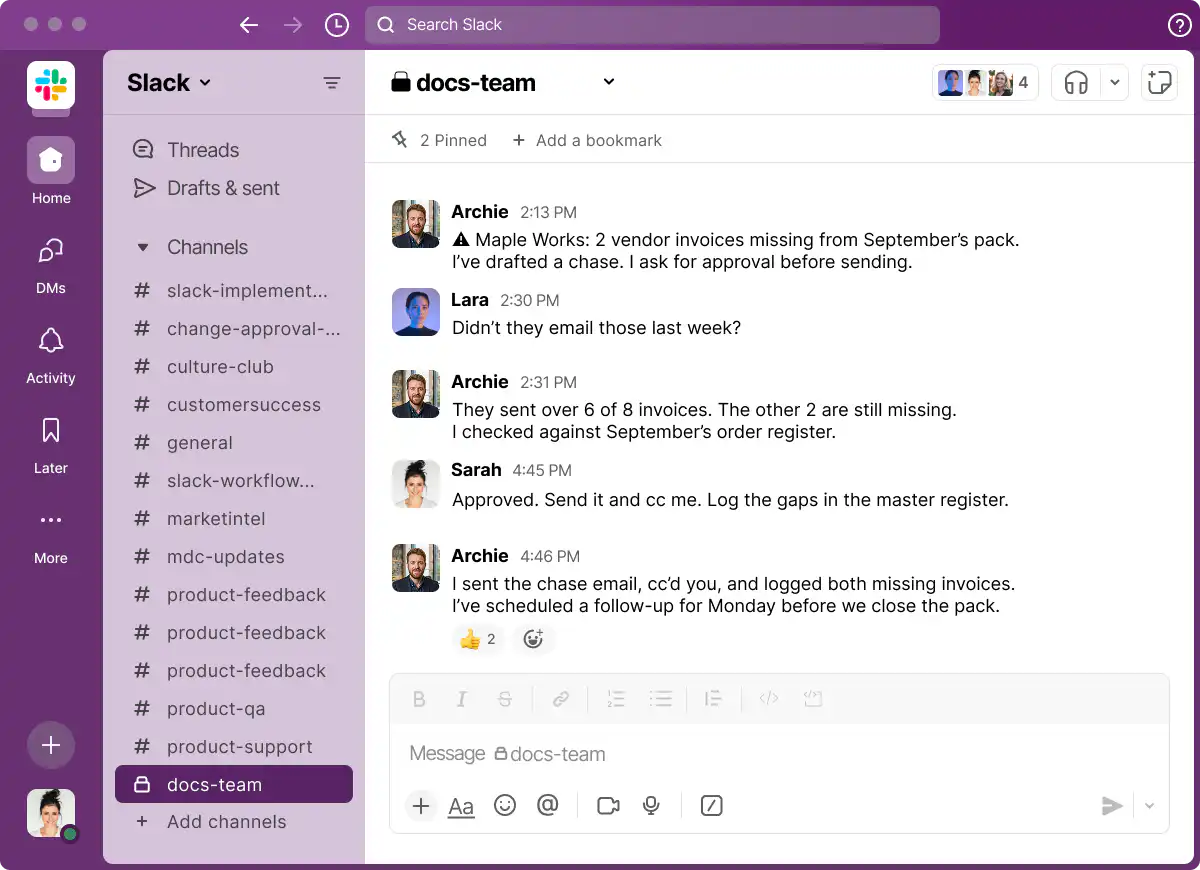
Archie working in Slack

Working with Archie

Why teams put Archie on the roster

Respond in seconds, not hours

Files each document as it arrives

No sick days, no notice period

Works nights, weekends and holidays

Deploys in days, not months

Chases missing documents for the team

What’s behind him

Archie is the virtual employee. Sheetgo is the engine underneath

Archie is the part the team talks to. Beneath him, Sheetgo connects chat, email, and Google Drive folders, processes the data, and keeps an auditable record in spreadsheets your organization owns — which is why his records link back to the source files and every action is traceable. He’s not a black-box chatbot bolted onto the organization’s data; he runs on a layer it controls.

Archie — the virtual employee

Reads and extracts document data for spreadsheets, 24/7 — ask him in Slack or Gemini Enterprise.

Workflows

Runs data entry step by step — reads files, extracts data, and keeps the master register current.

Connectivity

Bridges chat, email, Google Drive folders, and spreadsheets — incoming records reach one master file.

Data

Keeps a live, auditable master register in a spreadsheet your organization owns — each file, its status, and its assigned person.

Security & governance

Enterprise-grade by default

Archie runs inside the same security and compliance that 5 million users already trust.

SOC 2 Type II certified
GDPR compliant
Google CASA Tier 3 verified
Google Cloud Partner
Recommended for Google Workspace
Microsoft Partner
Dropbox Partner

Governed access

Archie sees only the sheets and data your organization authorizes – least privilege by design.

Full audit trail

Every action is logged: what it did, when, and on which data.

Organization-owned data

Virtual Employees operate on your organization’s Google Sheets files. Sheetgo doesn’t copy data into a black box.

Put Archie on the team’s roster

See Archie running on the team’s own documents, then price him for the team.