


If you need a reliable student attendance tracker and a way to analyze attendance over time, you could use something better than your memory and a stack of paper lists.
Luckily the education sector is steadily catching up with other workplaces and adopting new technologies to modernize working practices. Transforming time-consuming manual practices into automated processes. This saves teachers precious time and helps administrators run their schools more effectively.
However, it can be difficult to find software that’s both affordable for schools and easy for staff to use. Let’s go over Sheetgo’s Student attendance tracker template in Google Sheets.
Why use Google Sheets to create a student attendance tracker?
With the power of Google Sheets, educational institutions can design a customized attendance system to fit their specific requirements.
- Flexible: Create an attendance system to suit your school. If things change in the future just adapt your spreadsheets, without the need for new software or IT support.
- Accessible: Access data for all your classes from anywhere in the world on your laptop or smartphone.
- Compatible: Many other pieces of software integrate with Google Sheets. If you have data stored in other programs (such as Google Classroom), you can easily download or directly import that data and centralize everything in Google Sheets.
- Easy to use: Almost every professional works with spreadsheets at some point during their life. Google Sheets is a very intuitive and user-friendly system, even for spreadsheet novices. This makes maintenance and training easier, and you can be sure that your system is future-proof.
Sign up for Sheetgo and start recording and analyzing student attendance
Why use Sheetgo?
Sheetgo is a powerful tool that transforms how you manage data in spreadsheets. It streamlines collection, organization, and analysis, making it easier for users to simplify tasks.
This spreadsheet-based template by Sheetgo is a pre-built system for automated attendance management. It brings many benefits to the table:
- It can be used by any school, college, or training center.
- It offers teachers a simple and reliable way to take roll .
- It provides administrators with attendance records for every student and class.

What is a spreadsheet-based workflow template?
A regular attendance tracker template is a single file containing tables, charts, layouts, and formulas but a Sheetgo workflow template is mucho more. It’s a group of interconnected Google Sheets that exchange data between them. This allows you to share information with colleagues while working autonomously in your own individual file.
A spreadsheet-based workflow template gives you:
- Organization and data privacy
- Each file is task-specific, keeping data flows secure and separated. Teachers have their own personal spreadsheets for student attendance tracker.
- Authorities can combine confidential data from all professors and classes into one central spreadsheet and dashboard.
- Scalability
- Keep the system running smoothly by dividing data into separate, specialized spreadsheets. Sure, Google Sheets has a powerful sharing function. But if you have too many people working in the same file it can become overloaded and slow.
- To add new classes or teachers easily, simply duplicate one of the spreadsheets and share it with the corresponding person.
- Integration:
- Easily import and incorporate data from other software, a spreadsheet-based workflow
- Allows authorities to merge data from across the institution.
- In a matter of clicks, connect your attendance management workflow with your finance workflow to generate a top-level report for directors.
What do you get with this template?
When you install the Sheetgo student attendance tracker template, four Google Sheets files with pre-built Sheetgo connections are saved to your My Drive.
- Three Class spreadsheets:
- Share these attendance sheets for teachers, and make as many copies as you need for additional classes.
- Each teacher uses their copy of this spreadsheet to record if students are present, absent, excused, or tardy (late) for class.
- The spreadsheet automatically provides the teacher with averages and totals, so they can keep track of each student.
- One Attendance Management master sheet for the school administrator or head of department:
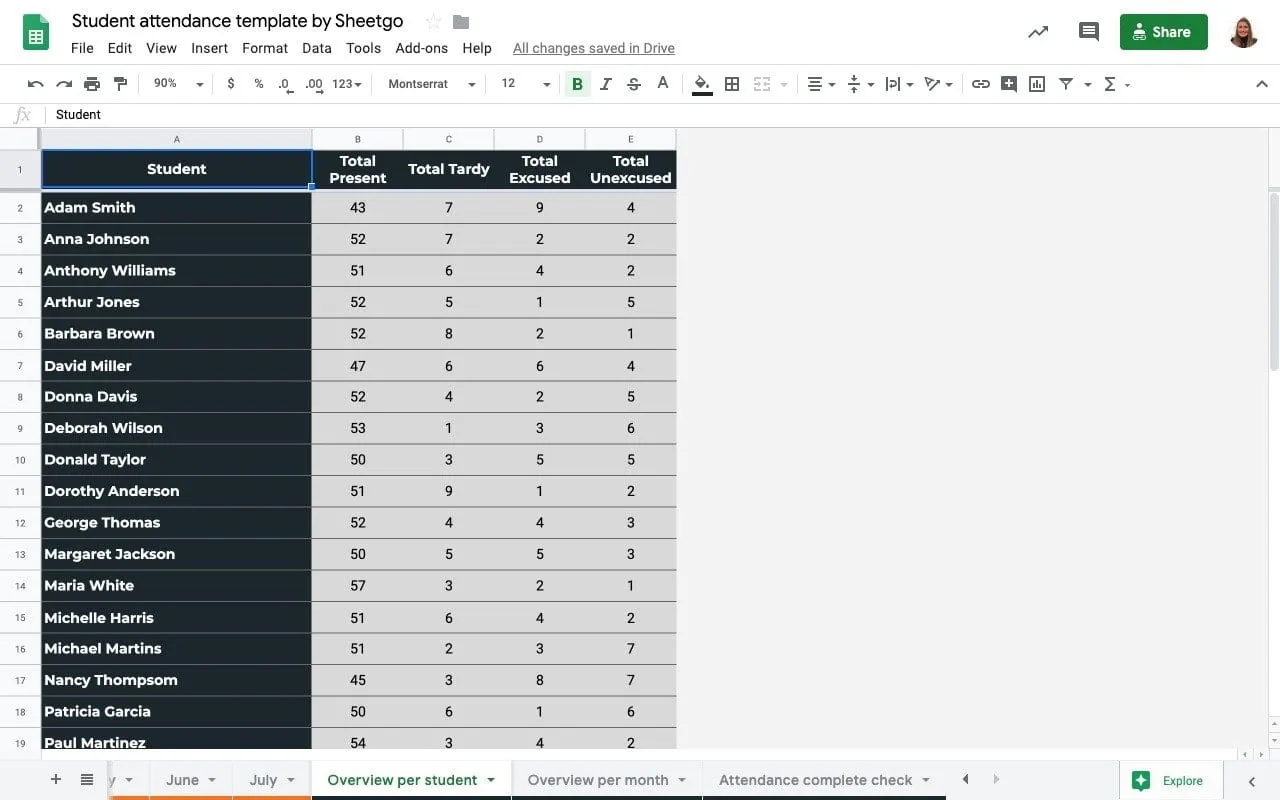
- Sheetgo connections pull data from all the Class spreadsheets directly into this file. A dashboard displays key information such as attendance rates per class and the top 10 students who are repeatedly absent, in easy-to-read charts.
- An attendance tracker tab allows you to check if roll was taken for every class, each day. It flags up any teachers who have forgotten to take attendance.
- An automated monthly attendance tracker and an overview per student.
How to install the attendance tracker template
- Login to Sheetgo with your Google, Microsoft, or Dropbox account.
- Click Install template, and Install on Google Drive.
- Wait a few moments while Sheetgo installs the template and creates the connections.
How the template works
The attendance management master file opens inside Sheetgo.
To open any of the spreadsheets, double click on the file in the sidebar on the right-hand side.

How to use the template
Step 1: Share with teachers
Share the Class spreadsheets with the teachers responsible for filling them out. To do this, open one of the files by double-clicking on it.
It opens inside Sheetgo. Move the blue sliding bar to the right of the screen and then open the file in a new browser tab by clicking Open in new.

Now rename the file as appropriate and click the green Share button to share the spreadsheet with the teacher responsible for that class.

Step 2: Enter student data
The spreadsheets in the template are provided with sample data to show you how the system works. Each teacher can overwrite the data with their own list of students, or if you’re the administrator you can do this for them.
Open a Class spreadsheet and go to the Instructions tab. Enter names in the Students list.
Start recording and analyzing student attendance

Step 3: Register attendance
During each class, the teacher can quickly take roll directly inside their spreadsheet.
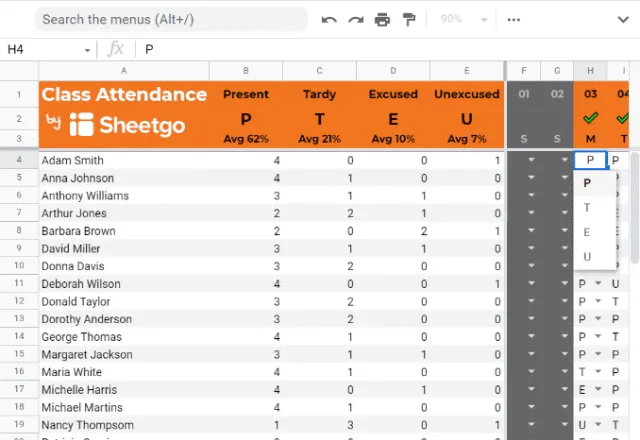
There is a tab for each month of the year. The days of the month run across the top of the screen from left to right.
Using the dropdown menu under each day, the teacher selects whether each student is present (P) tardy or late (T) excused or absent (E) or unexcused (U).
Step 4: Automate the workflow
Every time you update the workflow, fresh data is pulled from the teachers’ class spreadsheets directly into the management spreadsheet. You can do this manually by clicking Run but you can also schedule automatic updates to make sure you’ve always got the latest data from all of your classes.
Go to the floating menu bar and click Automate. Choose how often you want updates. For monitoring student attendance, once a day is usually frequent enough.
Start recording and analyzing student attendance

Your student attendance tracking system is up and running!
Check out the dashboard tabs in the management master sheet. You can add your school logo to the main dashboard. You can also enter school holidays in the Daily attendance checker tab.




 English
 Español
 Português do Brasil
 Français