Get help

Help center

Guides and answers

Contact support

Write to our team

Sign in to

Workflows

Build processes with your team

Automations

Connect files and automate tasks

One system, four parts

AI agents

Virtual Employees that work 24/7

Automations

Connect files and automate tasks

Workflows

Build processes with your team

Data Space

Trusted data sharing and control

Solutions by department

Finance

Reports, budgets, and reconciliations

Inventory and manufacturing

Stock, orders, and production in one view

HR

Timesheets, attendance, and reviews

Project management

Status and workload across projects

Sales and CRM

Leads and deals kept up to date

Education

Student records and school data

Finance

Turn manual finance work into reports that update themselves.

What Finance teams automate

  • Track payables and receivables
  • Build cash flow statements
  • Compare budget against actuals

Inventory and manufacturing

See stock levels and automate ordering.

What inventory and manufacturing teams automate

  • Track inventory across multiple sites
  • Connect sales, purchasing, and warehouse data
  • Link a barcode scanner to your sheet

HR

Run recruitment, attendance, and OKR tracking from your sheets.

What HR teams automate

  • Track recruitment and onboarding
  • Record team OKRs and results
  • Track check-ins, check-outs, and leave

Project management

Assign tasks and track hours without manual updates.

What project teams automate

  • Assign tasks and track status changes
  • Estimate effort and log hours worked
  • Track milestones across projects

Sales and CRM

Track leads and sales performance with automated reports.

What sales teams automate

  • Track and convert leads
  • Set sales goals and track team metrics
  • Monitor sales KPIs on dashboards

Education

Automate attendance, grades, and school purchasing.

What schools automate

  • Track attendance and notify parents
  • Record and compare class grades
  • Track inventory lent to students and staff

Find a use case

By department

How each team uses Sheetgo

By industry

How each industry uses Sheetgo

By company size

Small, medium-sized, or large

Learn

Blog

Guides and product news

Customer stories

How teams like yours use Sheetgo

Help center

Guides and answers

Why Sheetgo

Compare

How Sheetgo compares with other tools

Security

How we protect your data

Trust center

Our compliance details

Sign in to

Workflows

Build processes with your team

Automations

Connect files and automate tasks

One system, four parts

AI agents

Virtual Employees that work 24/7

Automations

Connect files and automate tasks

Workflows

Build processes with your team

Data Space

Trusted data sharing and control

Solutions by department

Finance

Reports, budgets, and reconciliations

Inventory and manufacturing

Stock, orders, and production in one view

HR

Timesheets, attendance, and reviews

Project management

Status and workload across projects

Sales and CRM

Leads and deals kept up to date

Education

Student records and school data

Find a use case

By department

How each team uses Sheetgo

By industry

How each industry uses Sheetgo

By company size

Small, medium-sized, or large

Get started

Templates

Ready-made workflows to start from

Learn

Blog

Guides and product news

Customer stories

How teams like yours use Sheetgo

Help center

Guides and answers

Why Sheetgo

Compare

How Sheetgo compares with other tools

Security

How we protect your data

Trust center

Our compliance details

Help center

Guides and answers

Contact support

Write to our team

Workflows

Build processes with your team

Automations

Connect files and automate tasks

Top 5 PDF generator tools in 2026

Although the PDF is a humble file that’s often overlooked in document formatting, it remains the most-used file type for sharing. Not only are PDFs universally compatible, but they also can compress huge files. This makes it the go-to solution for sending data. A PDF generator is, therefore, a great tool to implement in your business operations. It allows you to transfer your data or content directly into a PDF template, ready to share the final product with recipients.

As many of us send PDFs within and outside of organizations on a daily basis, we can use the tool for a variety of purposes. For example, your sales department can use it to create invoices for clients. On the other hand, your marketing department can turn the quarterly report on KPIs into a PDF ready to share across the whole company. All you have to do is have your data or content prepared!

Now that we understand what a PDF generator tool is and how it can be used across your organization, let’s take a look at our top 5 best PDF generator tools that you can implement into your operations in 2026!

Why use a PDF generator tool?

A PDF generator tool acts as an all-in-one solution for file sharing. Its compatibility with so many different files makes it a perfect tool to implement across all departments and projects within your organization.

Usually, a PDF generator can convert various files, including word documents and spreadsheets, into PDF. What’s more, some PDF generator tools can help to streamline your operations by automating the entire generation process. There’s no need to transfer your content to the PDF manually– the tool will do it all for you.

Top 5 PDF generator tools for 2026

Here are our top PDF generator tools for 2026, with a comprehensive breakdown of their key features.

1. Sheetgo

Start a free trial of Sheetgo Automations with the button below. Sign in with your Google or Microsoft account to get started.

Sheetgo Automations

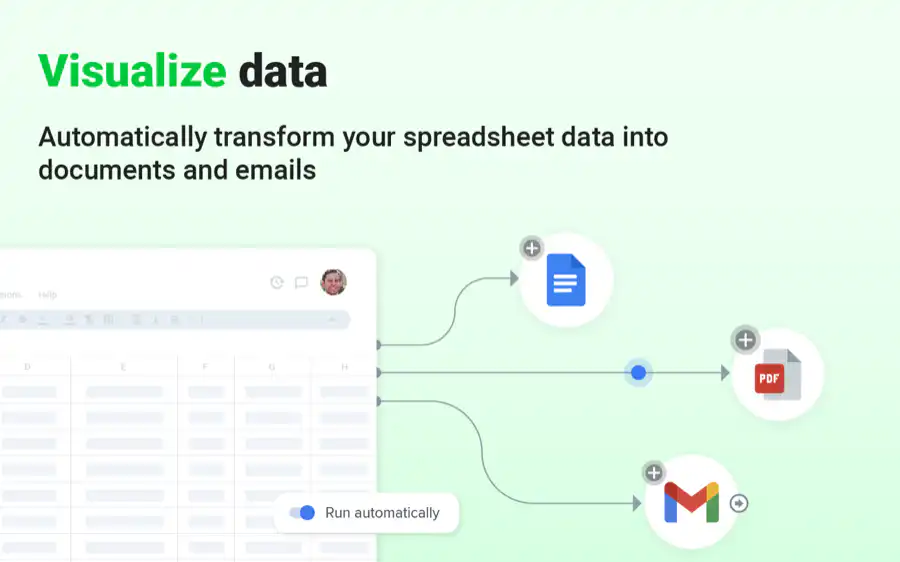
Sheetgo automatically generates PDFs based on any source data you add. It creates an automation that takes a spreadsheet full of data, transfers it to a customized template, generates it into a PDF, then sends it directly to its recipient. Sheetgo automatically carries everything out from start to finish. All you need to do is provide the source data and a template. With Sheetgo, you can create your own fully customized document template with smart tags that Sheetgo automatically replaces with your data. Each row of data in your spreadsheet will be created as a new document. Once completed, Sheetgo then turns the document into a PDF and allows you to automate the sharing process via its Gmail integration. Therefore, not only do you receive an entirely automated process that streamlines your operations completely, but you also have no restrictions in the format of your PDF, you can create any document template from invoices to contracts. PDF generation is included in Sheetgo Automations Pro, which you can try free for 14 days. Follow our step-by-step guide to creating PDFs from spreadsheet data to set it up.
Sheetgo Automations turning spreadsheet data into Google Docs, PDFs and emails
Get the PDF generator here: Sheetgo PDF generator

2. Adobe Acrobat Pro

As the original creator of the PDF, it’s no wonder that Adobe’s PDF tool offers everything you need to convert, edit and share PDFs. Adobe Acrobat Pro allows users to convert everything from word documents and spreadsheets to HTML and JPEGs, all into a PDF format. Its range of editing features allows you to customize the final product before sharing it with others. Adobe also includes a neat signature feature, perfect for PDF legal documents and forms. However, as an Adobe product, this tool comes at an expensive price and requires a lot of manual input.
PDF generator 2. Adobe Acrobat Pro
Get the PDF generator here: Adobe Acrobat Pro

3. Tungsten Power PDF

Tungsten Power PDF (formerly Kofax Power PDF) is considered the leading direct competitor to Adobe Acrobat Pro thanks to its similar features at a fraction of the cost. The Power PDF tool also allows you to convert, edit and share PDFs, with the same e-sign additional feature. Its Office-style interface makes it extremely easy to use, and the Standard and Advanced editions are perpetual licenses, so you pay once instead of subscribing. Although it’s a great one-off investment that provides Adobe-level features, users must still carry out the process manually.
PDF generator 3 Tungsten Power PDF
Purchase the PDF converter software here: Tungsten Power PDF

4. PDF Generator API

This PDF tool is designed to integrate into your current software. Design a document template on the tool, then the tool uses REST API to merge your data with the template to create custom PDFs. PDF Generator API also offers a simple drag-and-drop editor feature that makes the PDF editing experience feel seamless. Unlike many PDF generator tools, this one partly automates the data transfer process for you. However, it’s built for teams with developers on hand, and its price depends on the plan, so check its pricing page before you commit.
PDF generator 4 PDF Generator API
Get the PDF generator here: PDF Generator API

5. iLovePDF

Looking for a free tool for everyday PDF tasks? iLovePDF converts Word, Excel, and PowerPoint files into PDFs right in your browser. It can also merge, split, compress, and edit PDFs. Its free plan covers the core tools, which suits individuals and small teams with light use. Premium adds unlimited processing, desktop and mobile apps, and priority support. However, it works on the files you upload: it doesn’t pull data from your spreadsheets into a template or send the finished PDFs for you, so each document is still created by hand.
Get the PDF generator here: iLovePDF

Automatic PDF generation

And there you have it! PDF generator tools are a fantastic way to streamline your PDF generation processes across all of your departments. Sheetgo’s PDF generation feature not only allows you to create customized PDFs from your own document templates but also automates the entire workflow. This includes the data transfer to your template and sharing the final PDF product with its intended recipient. If you’d like to find out more about the top tools Sheetgo recommends to optimize your business, take a look at our related blog posts below!

You may also like…

business and productivity tips

Automating repetitive tasks to boost productivity and reduce workplace boredom

Every week, employees spend hours on repetitive tasks—manually updating spreadsheets, copying and pasting data, or waiting for approvals....
business and productivity tips

Differences of top-down vs bottom-up planning

This article will take a close look at top-down vs bottom-up planning. Comparing both approaches, how they work and when they should be...
business and productivity tips

Difference between OKRs and KPIs – How to track performance

Effective management tools like Objectives and Key Results (OKRs) and Key Performance Indicators (KPIs) are essential to help...