




Many financial ratios and metrics are available to evaluate a company’s financial health and performance. Often, a single metric can go by different names, and to make matters more confusing, different metrics often share similar names. For example, what exactly is the cost of debt? Is it the same as the before-tax cost of debt? And how does it differ from the after-tax cost of debt?
The cost of debt refers to the effective interest rate paid on the company’s total debt. This value is usually an estimate, particularly if calculated using averages. The amount paid in interest expenses varies from item to item and is subject to fluctuations over time.
When the cost of debt is mentioned without qualification, it usually refers to the before-tax cost of debt, though it depends on context. This value can then be used to calculate the after-tax cost of debt, which also considers the tax rate. Additionally, the cost of debt can be used to calculate the Weighted Average Cost of Capital, which considers both equity and debt.
In this guide, you will learn about the cost of debt, as well as how to calculate it before and after taxes have been paid. You will also learn how to use Microsoft Excel or Google Sheets to calculate the cost of debt and how Sheetgo’s AI finance virtual employee can keep the data behind those calculations up to date.
How to calculate cost of debt?
To calculate the cost of debt, first add up all debt, including loans, credit cards, etc. Next, use the interest rate to calculate the annual interest expense per item and add them up. Finally, divide total interest expense by total debt to get the cost of debt or effective interest rate.
cost of debt = total interest expense / total debt
Fortunately, the information you need to calculate the cost of debt can be found in the company’s financial statements, such as the balance sheet. The cost of debt metric is also used to calculate the Weighted Average Cost of Capital (WACC), which is often used as the discount rate in discounted cash flow analysis.
How to calculate after-tax cost of debt?
The reason why the after-tax cost of debt is a metric of interest is the fact that interest expenses are tax deductible. This means that the after-tax cost of debt is lower than the before-tax cost of debt.
To calculate the after-tax cost of debt, use the following formula:
after-tax cost of debt = effective interest rate * (1 – tax rate)
In the formula above, the value for the effective interest rate is equal to the cost of debt, which can be obtained using the formula in the previous section:
effective interest rate = total interest expense / total debt
In the next section, you have examples of how to calculate the before-tax and after-tax cost of debt using spreadsheet software.
Examples: calculate cost of debt in Excel or Google Sheets
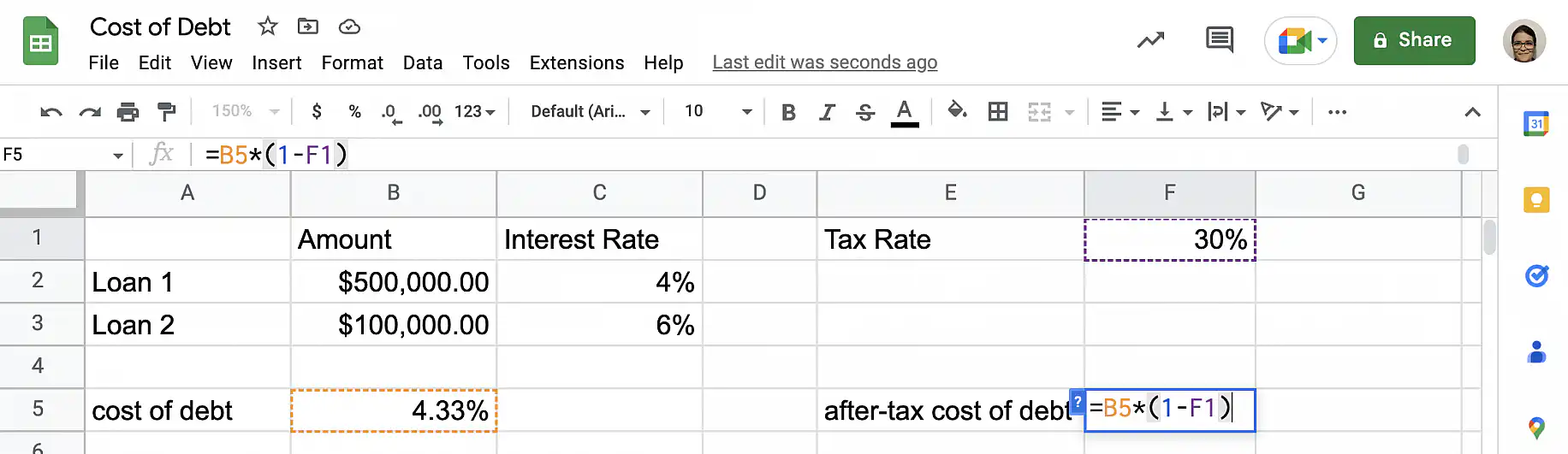
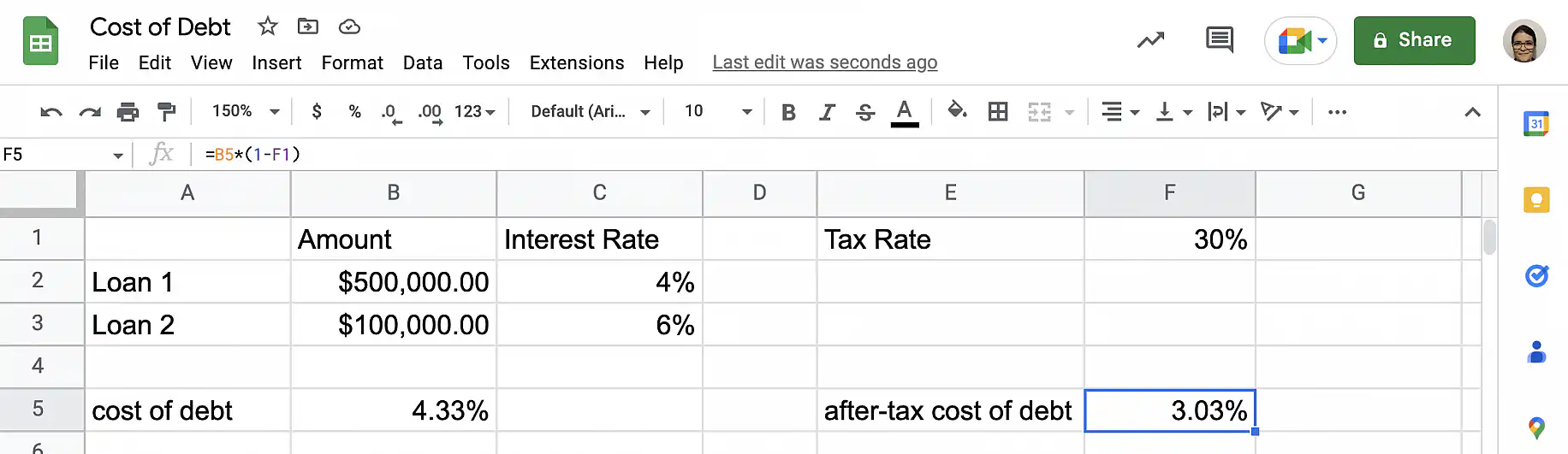
For this example, I will calculate Company A’s cost of debt. Company A’s debt consists of two loans: the first is for $500,000 with a 4% interest rate, and the second is for $100,000 with a 6% interest rate. I want to calculate the cost of debt before and after taxes, knowing that the company’s tax rate is 30%.
Follow the steps below to calculate the cost of debt using Microsoft Excel or Google Sheets.
1. Gather data
As with most calculations, the first step is to gather the required data. To calculate the total cost of debt, you need the value of the total debt, as well as the total interest expense related to the total debt. If you also want to calculate the after-tax cost of debt, you will need the tax rate.

2. Calculate before-tax cost of debt
In an empty cell, type in the formula for cost of debt or before-tax cost of debt.
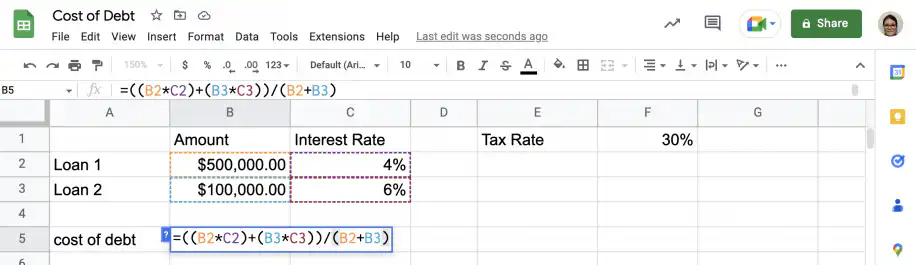
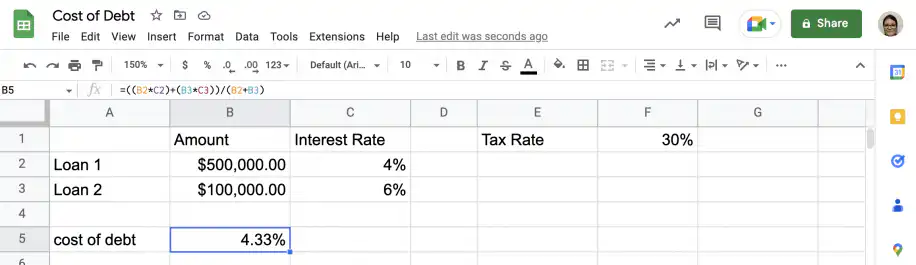
3. Calculate after-tax cost of debt
To calculate the after-tax cost of debt, you need the effective interest rate, or the cost of debt calculated in the previous step, and the tax rate.
When you need to perform calculations or carry out financial analyses, it’s common for the data you need to be spread out over multiple spreadsheets, often in different formats. Additionally, collaboration and synchronization can be problematic if you work as part of a team. Sheetgo’s AI automations connect those spreadsheets and update them on a schedule. You decide who can access each file, and everyone on the team works from the same numbers.
Conclusion
As you have seen, the cost of debt metric represents how much you pay in interest expenses in relation to the total amount of debt. In other words, it represents the effective interest rate for the company. The cost of debt can be calculated before and after taxes, as interest expenses are tax-deductible. Additionally, the cost of debt is used to calculate other important financial metrics, such as the weighted average cost of capital (WACC).
You now know what the term cost of debt means and how to calculate it before and after taxes. You also know how to use Microsoft Excel or Google Sheets to automate the calculations. Sheetgo’s AI automations take this further by syncing data across files and formats and updating it on a schedule.
To see the other side of a company’s funding, read our guide to the cost of equity. The debt-to-equity ratio shows how much of that funding comes from debt. For the obligations a company must pay within a year, see our guide to current liabilities.


 English
 Español
 Português do Brasil
 Français