



Sheetgo Forms
Turn your Google Sheets into forms
Share with anybody
Build a database
Automate processes
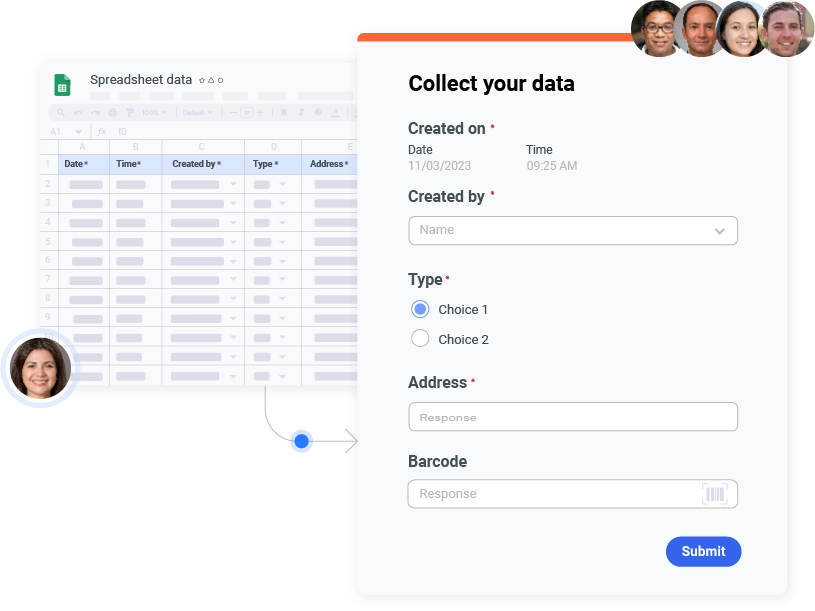
Create forms in seconds
1
Select an existing spreadsheet
Edit column headers as you would like them to appear in the form. Include advanced configurations to fully customize the end result.

2
Transform it into a form
Share it to get responses. Data from submissions will be sent to the original spreadsheet or to a new one.

See Sheetgo Forms in action
A simple guide to get you off the ground

Not sure how to get started?
Why Sheetgo Forms?
Find out all the benefits this tool has to offer

Start from a spreadsheet
All column headers will be turned into form fields. The format for each one will be configured automatically.
Use it on any device
Fill Sheetgo forms on the fly with your phone or from the comfort of your computer. Input is not lost if your internet connection fails.


Enjoy extreme flexibility
Need to add a new question? No problem, just update the original spreadsheet and keep collecting responses.
Automate your data processes
Implement Sheetgo workflows to automate entire business processes. Feed crucial data into your processes with forms.

Part of Sheetgo Workflows
Forms come built into Sheetgo Workflows, alongside dashboards and multi-step automation
Enjoy exclusive features
All the tools you need to get the job done
Autofill
Ensure data quality and make it easier for everybody
Subquestions
Make fields change dynamically as users input information
Data validation
Make sure users are filling in valid data
Barcode scanner
Use your computer or cellphone to scan bar codes easily
Try it out for yourself
Pick a spreadsheet, copy it and turn it into a form using Sheetgo

Survey

PO with barcode scanner

Income and expenses report
Ready to start on your own?
Sign up and start from your own Google Sheets
Frequently asked questions
Check out our learning center if your question isn’t covered below.
Are Sheetgo Forms free?
Forms are part of Sheetgo Workflows. Workflows has no free plan, but a 14-day free trial gives you every feature, including forms. Compare any of our plans. Everything is unlocked during the trial, so you can build and share real forms before you decide. Check our pricing page for detailed information.
How are Sheetgo forms better than other forms?
Sheetgo forms are unique because of their integration with Google Sheets. This integration enables simple data processing and advanced analysis. Key advantages include:
- Seamless Google Sheets Integration: Create forms directly from spreadsheet columns.
- Advanced Customization: Include conditional fields for dynamic forms that change with user input.
- Streamlined Workflows: Adopt Sheetgo’s data management platform to automate workflows and process data.
What are form configurations?
Sheetgo form configurations define the appearance and behavior of your form. They are set using square brackets in column headers. For example, a cell that contains “Email* [default:email]” will translate into a mandatory field named “Email” with the user’s email auto-filled as a default value. Amongst other things you can modify field types, set required fields, and establish default values.
Visit the detailed guide with all the possible configurations.
How secure are Sheetgo Forms?
Security is our top priority. Sheetgo Forms uses industry-standard security measures to ensure your data is protected, including SSL encryption for data in transit and secure, compliant data centers for data storage. We regularly update our systems and protocols to maintain high security and privacy standards.
Can I restrict access to Sheetgo forms?
Absolutely! You have different access levels to choose from:
Restricted: Only workflow users can submit responses.
Published to restricted users: Only specific users can submit responses.
Published to domain users: Anyone from your domain can submit responses.
Publish to the web: Anyone on the web can submit responses, even users without Sheetgo accounts.
What happens to the data collected through Sheetgo Forms?
Data from Sheetgo forms is updated in real-time, choose between sending it to the original Google Sheet or to a new spreadsheet. You can then use Sheetgo’s features to organize, analyze, or integrate this data with other tools and platforms as part of your workflow.
Can I edit a form after publishing it?
Yes, you can edit a form after publishing it. To change form fields, just edit the corresponding columns in the original Google Sheet. Finally, sync the form again to reflect all changes.
Is there a mobile app for Sheetgo forms?
Not yet there isn’t. But we are working on an app specifically for forms so you can have the best experience on the fly. Regardless, you can open and fill forms easily on your phone with your favorite browser.
 English
 Español
 Português do Brasil
 Français