

Business Process Automation vs. Robotic Process Automation: What’s the difference, and what should you use?
We will answer this question clearly and see how each automation works in different examples. We will also see examples of companies that used RPA and BPA.
RPA vs. BPA: What’s the difference?
BPA looks at the big picture and aims to optimize entire workflows. RPA, however, focuses on automating specific, repetitive tasks within those workflows. BPA often involves changing processes, systems, and even company culture. RPA is generally easier to implement, as it doesn’t require major changes to existing systems.
Now that we know the main difference between RPA and BPA, let’s look at each concept in more detail.
What is Business Process Automation (BPA)?
Business process automation (BPA) is simply using technology to automate repetitive tasks that people normally do at work. These could include automatically sending emails to customers, filling out forms, or checking inventory levels.
Imagine you work in a busy office where you have to send the same email to every new customer. Instead of typing it out over and over again, BPA would let you set up a system that sends the email automatically whenever a new customer signs up. You save time and make sure that every customer gets the same information.
BPA isn’t just for email marketing, though. You can also use it in almost any type of business like:
- Customer service: Answer common questions, process orders, and send personalized emails
- Human resources: Onboard new employees, manage payroll, and track vacation time
- Accounting: Generate invoices, reconcile accounts, and create financial reports
Key characteristics of BPA
Here are some key characteristics of Business Process Automation (BPA):
- Integration: BPA integrates with existing systems and applications, such as ERP, CRM, and HRM.
- Automation: It automates repetitive, manual tasks, such as data entry, document processing, and approvals.
- Workflow: It defines and enforces workflows. Tasks are completed in the correct order and within the required timeframe.
- Monitoring: BPA provides real-time processing performance. You can identify bottlenecks, track progress, and make data-driven decisions.
- Optimization: It continuously analyzes data to identify opportunities for improvement and optimization.
- Scalability: You can scale BPA to adapt to business needs and growth.
BPA case study
Vodafone Germany used Business Process Management (BPM) to upgrade their systems. They moved from old, complex systems to a new cloud-based setup, which made their operations more flexible, transparent, and scalable.
What is Robotic Process Automation (RPA)?
Robotic Process Automation (RPA) is a software you can program to do repetitive tasks on a computer. It follows a set of instructions to perform actions like clicking, typing, copying, and pasting data, just like a person would.
Think of it this way: if you have a boring task that involves clicking buttons, typing information, or following a set of instructions, you can train an RPA robot to do it for you.
Now, you might ask: Isn’t BPA and RPA the same thing? Don’t they automate tasks?
Yes, they both automate tasks, but on a different scale. For example, in a bakery, you can use BPA to change and automate the entire production line — from buying and storing ingredients to baking and distributing. However, you may only use RPA to automate one stage, like packaging.
In short, BPA affects a wider area, while RPA affects a smaller or one side of the business.
Real-life use case of Robotic Process Automation
Let’s see RPA in action. Imagine you run four local shops that sell smartphones, laptops, speakers, and more. Whenever a shop sells a product, it is automatically added to a Google Sheet. Each shop has a separate sheet for easy management, as shown in the image below.

Now, assume you want to track the weekly sales of the Samsung S24 Ultra in each shop. You’ll normally open each Google Sheet and manually count the number of sales. Imagine the nightmare if each shop sells 250 S24 Ultra. Another solution is to hire someone to perform this task. But whether you do it yourself or hire someone, you’ll waste time and money and will likely make mistakes.
That’s where Robotic Process Automation comes in. You can use a workflow tool like Sheetgo to automate this reporting task. Here is how:
1. First, connect your Google Sheets.

2. Select “Conditions” to filter data.
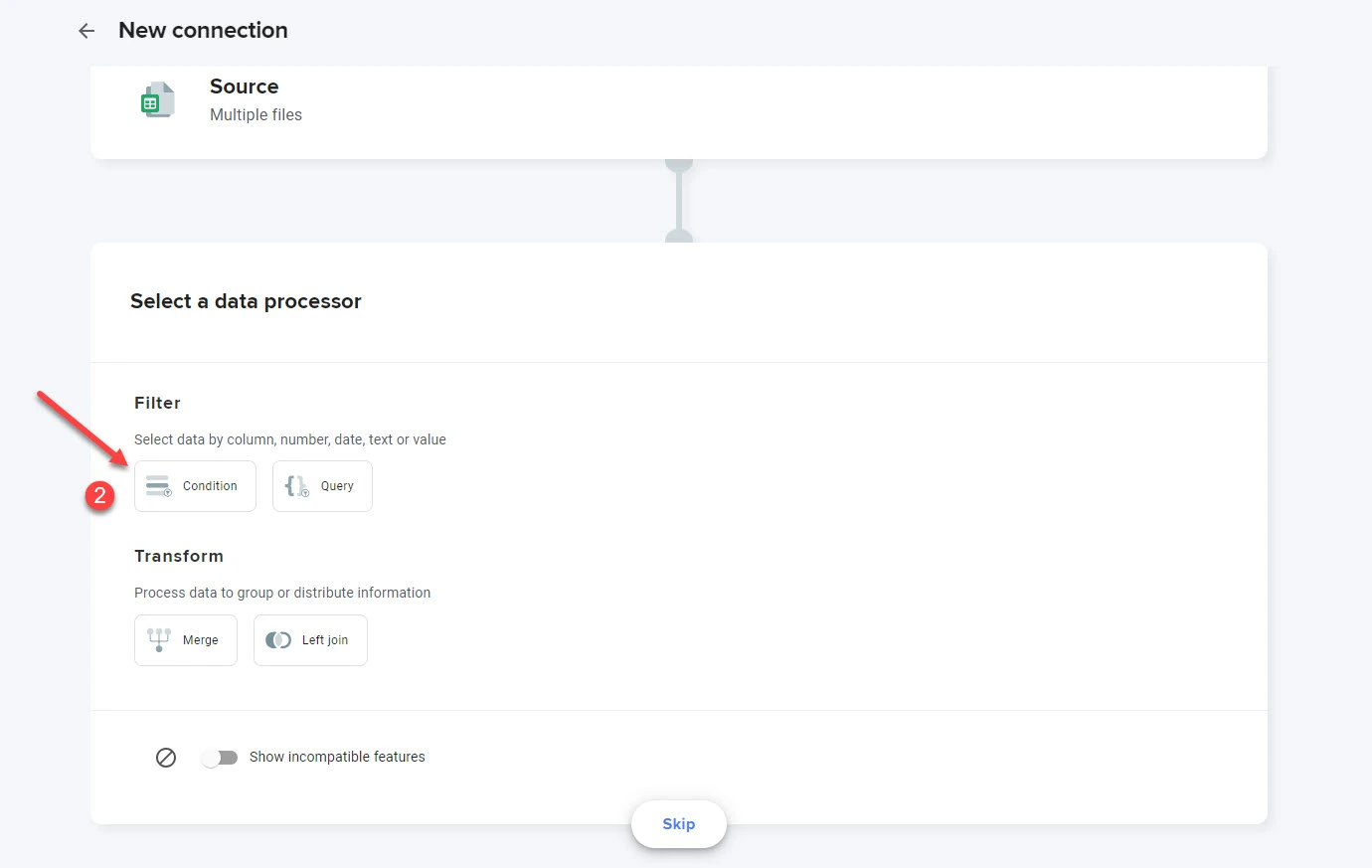
3. Select the column you want to get the information from, choose “Text is exactly,” and enter the name of the text Sheetgo needs to filter. In my case, I set “Column B: Product Name,” and the text is Samsung S24 Ultra. Click “Confirm.”

I want Sheetgo to scan these four sheets and check if the text “Samsung S24 Ultra” appears among the products we sold.
4. Next, select or create the destination file. Sheetgo will use this file or spreadsheet to report all S24 Ultra sales. Click “Finish and save.”

5. Sheetgo will now automatically scan your shops’s sheets to see if they sold a new S24, as you can see in the image below.

6. Finally, Sheetgo will create a report displaying the number of sales from each shop.

Did you see how RPA works? I used RPA principles to automate a reporting system (a section of my business). Thanks to this Google Sheet automation, you can focus on more important tasks while tracking sales.
You can use Sheetgo with Google Sheets and Excel to automate your finance, HR, CRM, supply chain, and more.
Siemens used Robotic Process Automation (RPA) to boost their operational efficiency. They implemented UiPath RPA to automate repetitive tasks across various departments like finance, human resources, and procurement.
This automation helped Siemens manage and verify data, process orders, handle bank transactions, and create purchase orders automatically. The deployment of RPA saved thousands of hours annually, improved process standards, and allowed employees to focus on more useful tasks.
When should you use robotic process automation?
Use Robotic Process Automation (RPA) when you have tasks that are repetitive, rule-based, and interacting with computer systems. Think of those boring, time-consuming chores like copying data between spreadsheets, filling out online forms, or extracting information from documents.
RPA is perfect for these kinds of tasks because it’s fast, accurate, and doesn’t need breaks. By handing these jobs off to software robots, you free up your employees to focus on more interesting and valuable work.
Business Process Automation vs Robotic Process Automation: To sum up
To sum up, BPA optimizes the entire company’s workflow by automating repetitive tasks. RPA, on the other hand, often automates repetitive tasks on a smaller scale, like a company department or process.