


O DCOUNTA no Planilhas Google conta o número de valores em uma matriz ou intervalo semelhante a uma tabela que atende a critérios específicos. É semelhante a uma consulta de contagem de banco de dados SQL. O ‘D’ em DCOUNTA significa ‘Database’ (banco de dados), portanto, trata-se de uma Banco de dados COUNTA fórmula. Considerando que a DCOUNT conta apenas valores numéricos, DCOUNTA conta valores numéricos e de texto.


Uma alternativa importante, mais eficiente e mais fácil de gerenciar

Sintaxe
DCOUNTA(database, field, criteria)
- banco de dados – the array or range containing the data you want the formula to operate on. The first row must contain the labels for for each column and you cannot use merged cells.
- campo – the column containing the values you want the DCOUNTA formula to count. This can be a text label or a numeric index when the first column is 1.
- critérios – an array or range containing the criterion/criteria that the formula uses to filter the banco de dados values before counting.
How to use DCOUNTA Formula
Let’s take a look at a few examples. To illustrate the formula in use, I’ve used sample data from a nutrition website.
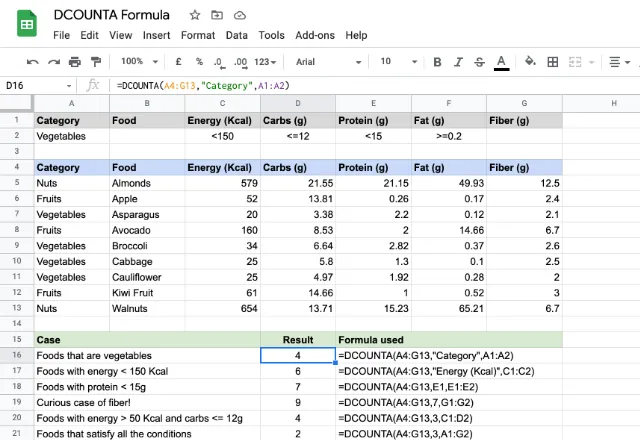
You can see that the data set is in a labeled tabular format spanning cells A4 through to G13. And the criteria are entered in cells A1 to G2. This is my chave.
Looking at the cases illustrated above, you’ll notice that it’s possible to specify one or more criteria to filter the counting process. For example, the case in row 7 counts the values in the “Protein (g)” column, subject to the criteria in cell E2. The case in row 9 counts the values from the “Energy (Kcal)” column, subject to the criteria in cells C2 and D2. The last case in row 10 includes all the criteria from A2 through to G2, and apparently there are two rows that satisfy all of these conditions, hence the result 2.
The case in row 8 is an interesting one! I didn’t specify anything in cell G2, but gave that reference to the DCOUNTA formula. The result is 9. Why? Because the formula counts everything in the “Fiber (g)” column as there is no criterion/criteria to filter out the rows.
Avoiding DCOUNTA problems
One thing to keep in mind is correct labeling. Take a look at the screenshot below:
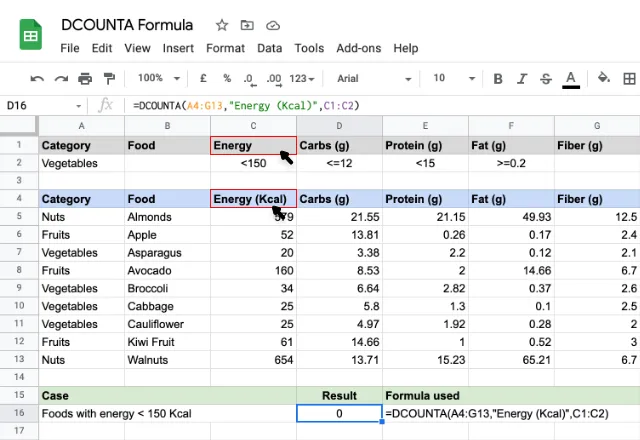
There’s nothing wrong with the formula but the result is incorrect. The problem lies with the labels. A missing or mismatched label prevents DCOUNTA formula from working. In the above example, the labels for the two parameters didn’t match so the formula returned a count of zero.
Using Google Sheets like a database
DCOUNTA is one of several Database functions in Google Sheets. If you organize your data in the correct tabular format, you can use these formulas to deliver results from a specific range of cells, a bit like a table in a database.
If you want to use Google Sheets like a relational database, it’s possible to go a step further and connect separate Google Sheets files. This enables you to push and pull data between them, and combine data in an automated workflow. Check out our guides on how to combine multiple Google Sheets to learn more.

 English
  Español
  Português do Brasil
  Français