

Anyone with sales experience understands the importance of regular and accurate sales reporting. Nevertheless, the fast-paced environment of sales often means that there’s little time left to sit down and analyze progress and results. As a result, it becomes difficult to create accurate forecasts or identify meaningful trends in your sales.
Due to these time constraints, sales departments benefit from having a robust sales reporting system. For instance, a well-designed system enables sales representatives to monitor leads and track the best-selling products and services. Consequently, employees who are active in the sales environment gain a lot of practical insight from a Sales report solution.
Often, it is hard for companies to decide which software to choose from the vast array of possibilities. In fact, for many SMEs and start-ups, specialist software can be expensive and turn out to be an unnecessary investment. Additionally, this type of software often has a steep learning curve.
As an alternative, you can create your own automated sales report template in Excel. By using spreadsheets, a tool that everybody knows, companies can easily create and implement a sales report template.
Why use an Excel-based template to create sales reports?
- Flexibility: Excel spreadsheets can be modified and changed according to your organization’s needs and requirements. As such, there is no need for complicated software solutions or putting pressure on your IT department to build a customized sales reporting system.
- Accessibility: Whether you are working from a tablet, a desktop, laptop, or smartphone, sales managers and members of the sales team always have access to the workflow.
- Compatibility: Microsoft Excel is easily compatible with other software that your organization might be using. Therefore, any sales-related data you already have is easily imported into Excel spreadsheets.
- Ease of use: Many employees are familiar with spreadsheets and if they are not, it is easy to train them. Indeed, using an Excel-based template is ideal for beginners and advanced users alike.
Start analyzing your sales data automatically

How to get started
The template can be used by sales teams of any size, selling any product or service. It provides your reps and account managers with a user-friendly way to record and share sales data. At the same time, it generates reports and dashboards for managers.What’s a spreadsheet template?
A spreadsheet template is a single file containing pre-built charts and formulas. There’s no longer any need to spend hours searching for the right files.
Get the Sales report template
Click the button below to get the template straight in your inbox.
How to use the Sales report template
Step 1: Open the input files
Open the spreadsheet you just downloaded.
In the Leads sheet, sales representatives enter and update their current leads in the Leads sheet.

Sign new clients and log all contract details in the Clients sheet.
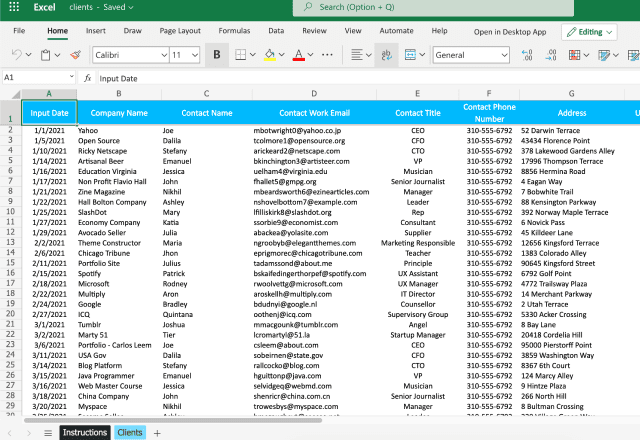
And log every new contract that is signed in the Contracts sheet.

Looking for more Excel templates?
Check out this post about Sheetgo’s income statement template for Excel.Did you like this post?
If you found this post helpful, share it with your colleagues and friends!
Start analyzing your sales data automatically



 English
  Español
  Português do Brasil
  Français