


Reed Porter

Reed Porter, AI business reporting virtual employee
Business reports on the team’s schedule.
Meet Reed Porter — Give Reed the team’s reporting cycle, whether it reports daily, weekly, or monthly. He keeps metric definitions consistent, reconciles account-level MRR, brings each department’s closed figures into one pack, explains what moved and why, and answers questions about any figure between closes. He works in the spreadsheets the team already uses and asks a person before anything consequential. Technically he’s an AI agent – but one with a job description: a name, a CV, and a role the team manages.
Ask us for his CV and we’ll send it over.
SOC 2 (Type II), GDPR, CASA tier 3 Compliant
Trusted by companies large and small












What the team can delegate to Reed
One virtual employee across the whole reporting cycle
Define and reconcile
- •Keep one definition per metric in a glossary
- •Reconcile per-account MRR before reporting any total
- •Check that the parts add up across sources
- •Apply attribution once, consistently
Close and consolidate
- •Close each reporting period on a hard cutoff
- •Bring department figures into a pack with fixed sections
- •Compare months, years, and plan on the same basis
- •Ask a person before restating a closed period
Explain and alert
- •Rank movements by absolute business impact
- •Name the account behind a swing and show totals without it
- •Alert metric owners to discrepancies and unclosed sources
- •Pull reporting data from your organization’s systems through APIs and webhooks
580
organizations he learned business reporting from
75
industries
24/7
on duty
10
years in the field
How the team works with him
Talk to him where your organization already works
No new app to open. Reed joins the chat tools the team already uses — assign work in plain language, and he reports back, asking a human’s approval before anything consequential. Reed arrives knowing his job, so the team doesn’t need to learn prompts; it reviews what he flags and approves what matters, just as it would with anyone reporting to it.
Works with
Slack, Gemini Enterprise, Google Chat, and more.
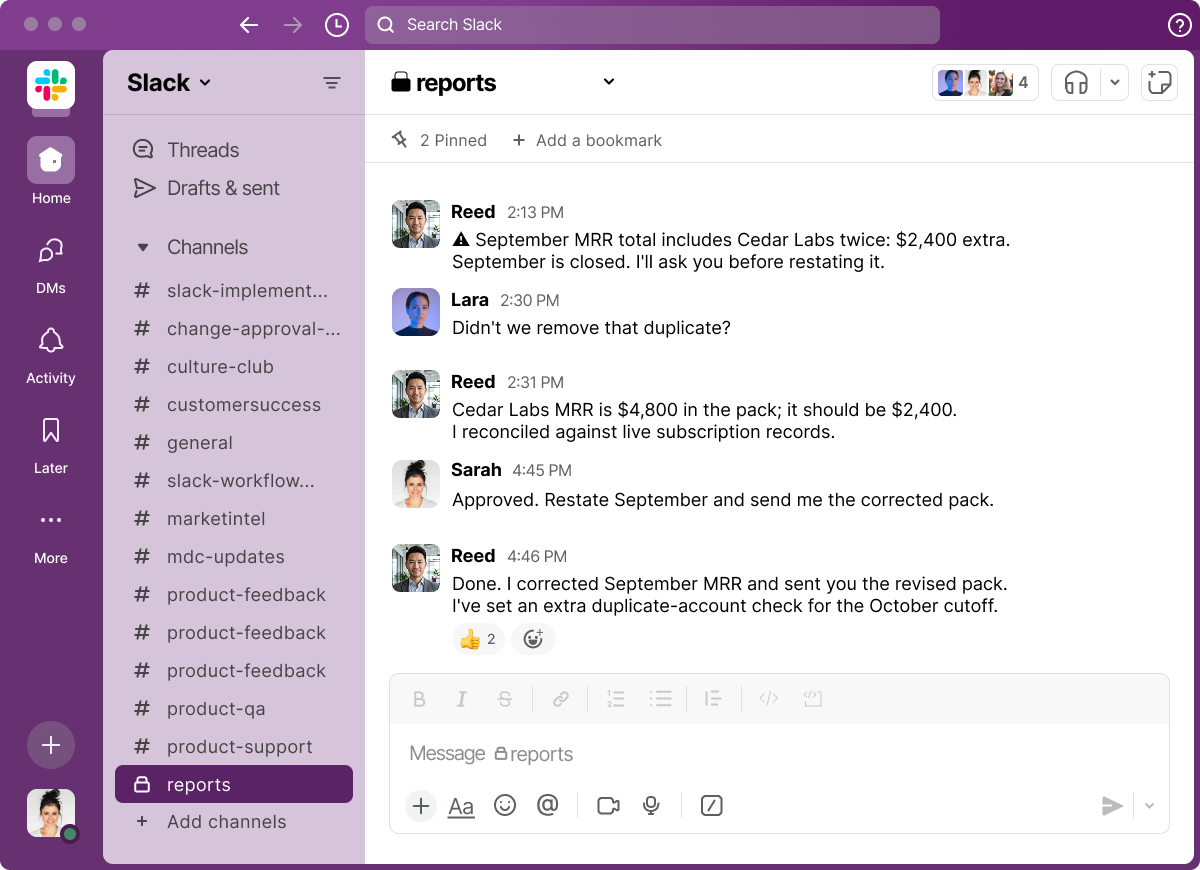
Working with Reed
Why teams put Reed on the roster
Respond in seconds, not hours
Checks earlier years before calling a change unusual
No sick days, no notice period
Works nights, weekends and holidays
Deploys in days, not months
Asks before correcting figures or changing definitions
What’s behind him
Reed is the virtual employee. Sheetgo is the engine underneath
Reed is the part the team talks to. Sheetgo connects reporting sources such as HubSpot, Stripe, QuickBooks, Google Analytics, Zendesk, and Jira, plus other systems through APIs and webhooks. Reed keeps reporting data in Google Sheets, Excel files, or BigQuery tables that can also feed Looker Studio, Power BI, and Tableau dashboards. He’s not a black-box chatbot bolted onto the organization’s data; he runs on a layer it controls.
Reed — the virtual employee
Answers questions about any figure in chat, with the metric’s value, its definition, and its period.
Workflows
Reed runs daily, weekly, or monthly reporting on Sheetgo Workflows: reconciles MRR, closes periods, and assembles figures.
Connectivity
Sheetgo connects the organization’s spreadsheets with CRM, revenue, analytics, and support tools so Reed can check totals across sources.
Data
Reed keeps each reporting period in the team’s spreadsheets. He closes on a hard cutoff and asks before restating a closed period.
Security & governance
Enterprise-grade by default
Reed runs inside the same security and compliance that 5 million users already trust.


Governed access
Reed sees only the sheets and data your organization authorizes – least privilege by design.
Full audit trail
Every action is logged: what it did, when, and on which data.
Organization-owned data
Virtual Employees operate on your organization’s Google Sheets files. Sheetgo doesn’t copy data into a black box.
AI and hosted Data Space regions
Choose the US or Europe; the US is the default. Core infrastructure and identification data stay in the US.
No training on organization data
Sheetgo and its AI providers don’t train general AI models on the organization’s content, personal data, or integration data.
Admin-controlled access
The organization’s admin chooses who can use the agent. In Gemini Enterprise, they add it and select users or groups.
Put Reed on the team’s roster
See Reed running on the team’s own reporting data, then price him for the team.
 English
 Español
 Português do Brasil
 Français